
You’re drowning in repetitive tasks that eat hours you’ll never get back, yet handing control to AI feels risky. The truth is, automation doesn’t mean surrendering oversight; it means reclaiming your time while staying in the driver’s seat. ChatGPT 247 helps individuals and businesses tap into AI solutions that handle the grunt work, scheduling, email drafting, data sorting, so you can focus on decisions that actually move the needle.
This guide walks you through a practical method to set up AI assistants that work for you, not instead of you, with clear boundaries and checkpoints. You’ll learn which tasks to delegate, how to maintain quality, and when to step back in.
Introduction to Artificial Intelligence Assistants
What is an Artificial Intelligence Assistant?
An artificial intelligence assistant is a digital helper that uses technologies like natural language processing and machine learning to interpret your requests, take action in your tools, and learn your preferences over time. Instead of just answering questions, a modern assistant can draft messages, update records, schedule meetings, summarize long documents, and coordinate tasks across your apps in one place. For busy professionals and teams using ChatGPT 247, this means you can express what you want in plain English and let the assistant handle the operational details while you stay focused on higher value work.
The Evolution of AI Assistants (2010-2026)
In the early 2010s, mainstream assistants like Siri and Google Assistant were mostly voice search tools that set alarms, answered trivia, or launched apps. By the mid‑2020s, advances in large language models and agentic AI turned assistants into goal‑driven agents that can plan, decide, and execute multi‑step workflows with only light human supervision. Today, systems such as ChatGPT, Gemini, and specialized tools highlighted on ChatGPT 247 can notice a stalled sales deal, draft a follow‑up sequence, schedule a call around conflicts, and log every interaction back into your CRM without you manually orchestrating each step.
- Modern artificial intelligence assistants are designed for non‑technical users, with conversational interfaces that feel closer to talking to a colleague than configuring software rules.
- Most leading platforms now support deep industry customization, so ChatGPT 247 can surface workflows tailored to fields like finance, healthcare, education, and software development.
- AI assistants have shifted from nice‑to‑have utilities to core productivity infrastructure for knowledge workers and small businesses.
- Their rapid evolution has made them more accessible, affordable, and capable of handling genuine workload, not just convenience tasks.
How Artificial Intelligence Assistants Work
Core Technologies: NLP, Machine Learning, and Agentic AI
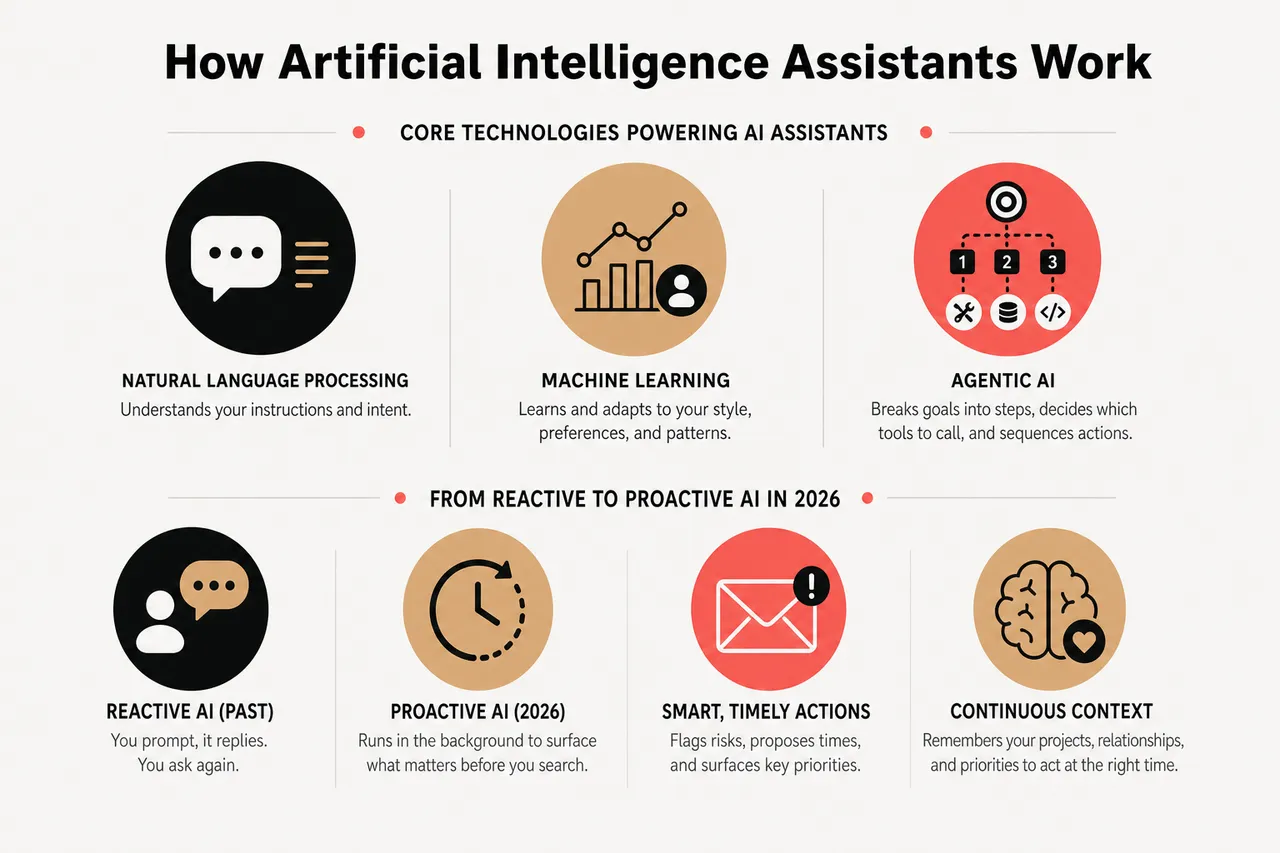
Under the hood, AI assistants rely on natural language processing to understand your instructions and machine learning to adapt to your style, preferences, and recurring patterns. When you ask an assistant in ChatGPT 247 to “pull last quarter’s customer feedback and highlight the top three themes,” the model parses intent, identifies relevant data, and structures an answer that fits your usual format. On top of that, a new layer called agentic AI lets assistants break complex goals into smaller steps, decide which tools to call, and sequence actions to reach a result, which is why they can now automate full processes instead of isolated tasks.
Reactive vs Proactive AI in 2026
Most early assistants were reactive: you prompted them, they replied, and nothing happened until you asked again. In 2026, leading tools showcased on ChatGPT 247 are increasingly proactive, running in the background across your inbox, calendar, and business systems to surface what matters before you even search. A proactive assistant can monitor approaching deadlines, flag a single high‑risk email in a crowded inbox, propose a new meeting time when conflicts appear, or remind you to follow up with leads who opened your pricing email but never replied.
- Proactive assistants rely on continuous context: they maintain memory of your projects, relationships, and priorities so they can trigger helpful actions at the right time instead of acting blindly.
- Because they can chain multiple steps across apps, they are well suited for multi‑stage workflows like onboarding, customer support escalations, and monthly reporting, which ChatGPT 247 can help you design and monitor.
- Advanced AI assistants increasingly function as semi‑autonomous agents that plan, act, and learn within guardrails you define.
- This agentic behavior is what turns them from chat tools into true teammates embedded in your daily operations.
Practical Applications and Benefits of AI Assistants
Key Use Cases for Individuals and Businesses
Artificial intelligence assistants now touch almost every aspect of knowledge work, and ChatGPT 247 focuses on making these capabilities practical rather than theoretical. Common use cases include:
- Inbox and communication management: Assistants can triage your inbox, group similar messages, draft replies in your tone, and highlight the few emails that truly require attention. For example, some leading assistants in 2026 can watch for stalled deals and suggest follow‑ups at exactly the right moment, reducing the cognitive load of “always checking email.”
- Calendar and scheduling automation: Instead of manually proposing times, assistants can view your constraints, consider focus blocks, and negotiate meeting times that respect everyone’s availability. Over time, they learn that you prefer deep work in the mornings and will automatically protect that time when booking new appointments.
- Task capture and project coordination: When you mention “Let’s send a summary to the client next week” in a meeting transcript, an AI assistant can convert that into a task, assign it to the right teammate, and add it to your project tool. Integrated through ChatGPT 247, this helps ensure fewer commitments slip through the cracks.
- Customer support and self‑service: AI chatbots embedded in websites and messaging apps provide instant answers, escalate complex cases, and keep full context across channels. In many organizations, assistants now deflect a significant share of routine tickets while still handing edge cases to human agents with well‑organized summaries.
- Knowledge management and reporting: Assistants can search across documents, CRMs, and analytics platforms, then generate tailored summaries instead of forcing you to dig through dashboards. This is especially powerful when combined with automated weekly reports that land in your inbox, prepared by an AI that already knows which metrics matter to you.
- Content creation and localization: Teams increasingly rely on AI for first‑draft blog posts, sales emails, internal documentation, and social copy. When paired with translation and tone adaptation, a single source text can become localized content across markets, a pattern ChatGPT 247 highlights for businesses expanding internationally.
Across sectors like healthcare, finance, education, and creative industries, assistants are now embedded in scheduling, compliance checks, classroom support, and campaign management. The common thread is that they sit on top of existing tools, orchestrating information and actions so humans can focus on nuanced judgment and relationship building.
Measurable Benefits: Productivity and Beyond
Organizations that adopt AI assistants in a structured way see gains that are both tangible and trackable rather than vague productivity claims. Surveys of knowledge workers using modern assistants report time savings in the range of a few hours per week, often concentrated in email, meeting prep, and documentation. For software teams, AI coding assistants already generate a large share of boilerplate code and accelerate review cycles, which is a concrete illustration of how automation can free specialists to focus on architecture and problem solving rather than repetitive implementation.
- Time reclaimed from low‑value work: When assistants handle scheduling, reminders, summarization, and routine drafting, individuals consistently report freeing up 20 to 30 percent of their week for higher impact work. For a small business owner or team lead, that can mean several extra hours for strategy, client conversations, or product improvements instead of inbox cleanup.
- Error reduction and better consistency: By standardizing how recurring processes are executed, AI assistants reduce manual errors in tasks like data entry, document generation, and compliance workflows. This consistency not only cuts rework but also makes audits and reviews less painful because every step is logged and repeatable.
- Faster response times and better customer experience: Always‑on assistants can answer common questions instantly, route complex issues correctly, and prepare agents with context before they step into a conversation. Businesses integrating these capabilities through ChatGPT 247 often see shorter resolution times and more positive feedback without needing to extend human coverage around the clock.
- Higher quality decisions from better information: When it becomes trivial to ask, “Show me the key trends from last quarter’s feedback” or “Summarize issues mentioned in more than three tickets this week,” leaders gain a more accurate view of reality. Assistants pull patterns from large, messy data so humans can make informed decisions instead of guessing based on anecdotes.
- Reduced cognitive load and burnout risk: Offloading remembering, reminding, and repetitive drafting to an assistant lightens the mental overhead of modern work. Users often describe a sense of calm when they trust that tasks are captured and nudges will arrive on time, a benefit that does not show up as a metric but strongly influences long‑term engagement and retention.
- AI‑assisted image generation can compress days of concepting and revision into a handful of guided prompts, making it easier for marketing teams to experiment with many visual directions before committing budget to final production.
- Pairing automated translation with human review gives global teams a cost‑effective way to scale multilingual content, which ChatGPT 247 can help orchestrate by routing drafts to the right reviewers and tracking status.
- Artificial intelligence assistants are not abstract future promises; they are already delivering measurable efficiency, quality, and experience improvements.
- The organizations seeing the biggest gains are those that deliberately redesign workflows around assistants instead of simply “adding AI on the side.”
Integrating AI Assistants into Daily Workflows
Step‑by‑Step Integration Guide
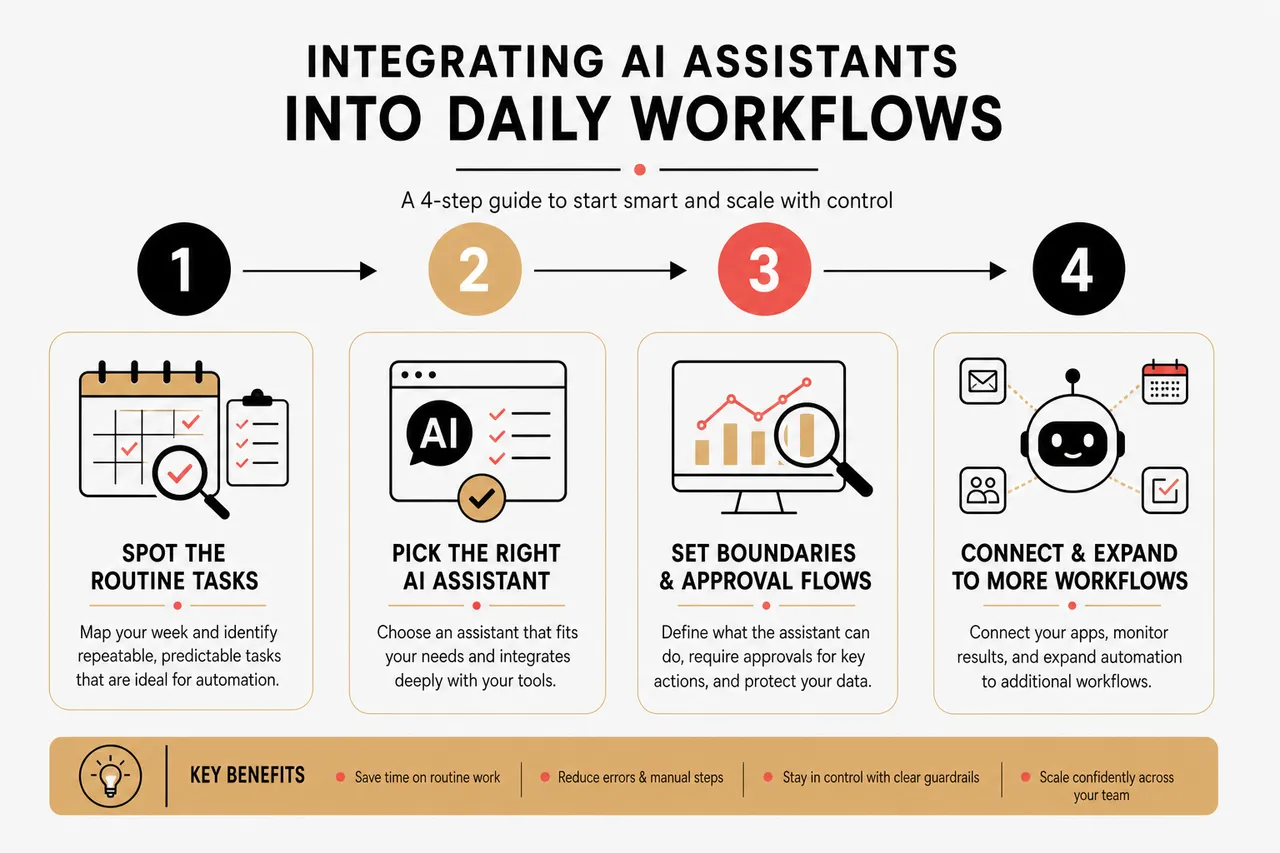
Getting started with an artificial intelligence assistant is less about buying a tool and more about carefully choosing where it can help first. ChatGPT 247 encourages a phased approach that reduces risk and maximizes early wins:
- Spot the routine tasks: Begin by mapping your week and highlighting activities that repeat frequently and follow predictable patterns, such as meeting scheduling, status updates, and standard replies. The goal is to identify work that consumes time but does not require deep expertise or sensitive judgment, making it ideal for safe automation.
- Pick the right AI assistant: Use curated comparisons on ChatGPT 247 to select an assistant that matches your environment, such as one optimized for inbox automation, project workflows, or enterprise security. Pay attention to integration depth with your email, calendar, CRM, and collaboration tools, because an assistant that cannot access these systems will always feel limited.
- Connect to your existing apps: Once you choose a tool, connect it to the services you use every day so it can read relevant data and act on your behalf. Many top assistants integrate with hundreds or thousands of applications, which means a single conversational interface can update CRM records, log meeting notes, and move tasks between project boards without manual copying.
- Set boundaries and approval flows: Before turning on full automation, decide which actions the assistant can perform autonomously and which must always require your confirmation. For example, you might allow it to draft emails automatically but require approval before sending, or let it propose schedule changes but not confirm them without your review.
- Train your team and normalize usage: Provide simple playbooks and live demos that show colleagues exactly how to hand work to the assistant and what they can expect in return. When teams understand that the assistant is there to support them, not monitor them, adoption rises and people start proactively suggesting new automation opportunities.
- Review, refine, and expand: Regularly examine the assistant’s activity logs and the outcomes it generates, then adjust rules, prompts, and permissions accordingly. As confidence grows, ChatGPT 247 can help you identify more advanced workflows to automate, layering capabilities instead of trying to do everything at once.
Best Practices for Effective Use
- Match automation depth to risk level: Tasks with low downside, like drafting internal summaries or suggesting meeting times, can be highly automated from the start. High‑impact actions, such as sending financial communications or approving access changes, should keep a human in the loop until you have built a long track record of safe behavior.
- Establish regular check‑ins on automated flows: Put calendar reminders in place to review key automations monthly or quarterly, focusing on error patterns and edge cases rather than average performance. These reviews help you refine prompts, update decision rules, and retire workflows that no longer match how your organization operates.
- Communicate clearly with all stakeholders: Let colleagues, clients, and partners know where AI is involved in your processes, especially when it interacts with them directly. Transparency not only builds trust but also invites useful feedback when something feels off, which you can then feed back into your ChatGPT 247 setup.
- Start by automating one or two high‑volume, low‑risk workflows so people experience quick wins and build confidence in the assistant’s reliability before tackling more sensitive areas.
- Document each automation with purpose, triggers, steps, and fallback behavior so anyone on the team can understand what the assistant is doing and how to pause or adjust it if needed.
- A disciplined rollout plan keeps AI assistants from becoming chaotic or opaque and instead turns them into predictable partners in your work.
- Continuous training and feedback loops ensure that the assistant evolves alongside your processes rather than drifting out of sync over time.
Maintaining Control and Oversight with AI Assistants
Data Privacy and User Control
Concerns about privacy and control are valid, especially when an AI assistant has access to email, documents, and internal systems. To protect sensitive information, look for tools that explain how your data is stored, processed, and used to train models, and verify that they support regionally appropriate compliance standards. Within ChatGPT 247, you can prioritize platforms that offer strong encryption, data residency options, and clear commitments that your private content will not be used to train models shared across customers.
- Granular permissions and access scoping: Configure assistants so they can only see and act on the minimum data required to perform their tasks. For example, limit an assistant responsible for support triage to ticket content and knowledge base articles rather than granting full access to HR files or financial systems.
- User‑controlled memory and retention: Some modern assistants allow you to inspect and edit their long‑term memory of your preferences, projects, and contacts. Being able to erase or correct this memory directly gives you more control over how much context the assistant accumulates about you over time.
- Clear separation of environments: In organizations, it often makes sense to keep testing, staging, and production data separate so you can experiment with new automations safely. ChatGPT 247 can help teams evaluate which assistants support this kind of environment separation and which do not.
Oversight and Monitoring Techniques
Maintaining oversight is less about watching every individual action and more about having robust visibility, alerting, and human checkpoints where they matter most. Good assistants provide detailed activity logs showing what they did, when, and based on which instruction, so you can reconstruct decisions and trace their impact. With the right setup, you can benefit from extensive automation while still being able to answer the question “Why did the assistant do this?” in a concrete way.
- Audit logs and traceable actions: Ensure that every email sent, meeting scheduled, or record updated by the assistant is recorded with relevant context. This traceability not only supports compliance and incident response but also makes it easier to refine prompts when outcomes are close to correct but not quite right.
- Thresholds, alerts, and exception handling: Configure alerts for unusual patterns, such as an assistant suddenly sending many messages, repeatedly failing an integration call, or attempting access outside its normal scope. A handful of well‑chosen alerts is more effective than trying to monitor everything manually and missing the real signals in the noise.
- Human‑in‑the‑loop for key decisions: For actions with significant financial, legal, or safety implications, keep a human approval step built into the workflow. In practice, this can mean the assistant prepares and recommends an action, but a person must click “approve” before it takes effect, preserving human accountability.
- Schedule periodic reviews where a cross‑functional group scans assistant logs, focusing on edge cases and near misses, then updates guidelines and prompts to prevent similar issues in the future.
- Leverage role‑based access controls so that only specific admins can modify high‑impact automations, reducing the risk of accidental or unauthorized changes.
- With transparent logging, permission controls, and thoughtful human checkpoints, you can safely benefit from automation without surrendering oversight.
- Regular audits not only protect data but also create opportunities to improve workflows as you learn how the assistant behaves in real conditions.
Real‑World Examples and Case Studies
Industry Case Studies
- Healthcare operations and patient support: Clinics use AI assistants to manage appointment scheduling, send post‑visit instructions, and flag patients who might miss critical follow‑ups based on patterns in attendance and communication. When integrated through secure channels, these assistants free staff to spend more time in direct patient care instead of phone calls and manual reminders.
- Financial services and compliance: Banks and fintech firms deploy assistants to monitor transactions for anomalies, prepare audit‑ready reports, and keep internal policies aligned with evolving regulations. Rather than replacing compliance teams, these systems handle the first pass of data review, allowing specialists to focus on ambiguous or high‑risk cases.
- Education and learning support: In schools and training programs, AI assistants help manage grading queues, answer common student questions, and tailor practice materials based on observed strengths and weaknesses. This gives educators more time for high‑value interactions while still ensuring every learner has access to timely explanations and resources.
- Creative and marketing workflows: Agencies and in‑house teams rely on assistants to brainstorm concepts, generate copy variations, test alternative visual directions, and manage campaign calendars. Assisted by platforms recommended on ChatGPT 247, they can experiment more broadly while keeping the final editorial voice firmly in human hands.
Personal Productivity Success Stories
- Freelancers and independent professionals: Solo workers use assistants to automate invoicing, follow‑up reminders, and proposal drafting so they can spend more hours delivering work and fewer on administrative tasks. Over time, the assistant learns their pricing patterns, preferred contract clauses, and communication style, making each new engagement easier to spin up.
- Small business owners and startup teams: Founders integrate assistants via ChatGPT 247 to coordinate calendars, keep hiring pipelines organized, and maintain consistent communication with customers across channels. For lean teams without dedicated operations staff, this can approximate having an always‑available virtual chief of staff that handles logistics and keeps everyone pointed at the same priorities.
- The most successful deployments start with a narrow slice of work, measure outcomes, and then gradually expand scope as trust and familiarity grow.
- Concrete examples from healthcare, finance, education, and creative work show that AI assistants are already embedded in critical workflows, not just experiments on the side.
- Seeing how peers structure their automations can give you a blueprint to follow, which ChatGPT 247 helps surface through curated guides and playbooks.
New Frontiers: Strategy, Ethics, and Skills for AI‑Ready Teams
Designing a Human‑Centered AI Strategy
As assistants become more capable, the organizations that benefit most are those that intentionally design around human strengths instead of chasing blanket automation. A human‑centered strategy starts by asking where uniquely human skills like empathy, negotiation, and complex judgment create the most value, then uses assistants to clear space for exactly those activities. ChatGPT 247 supports this approach by framing AI not as a replacement for people but as an amplifier for the work only people can do.
Ethical Guardrails and Responsible Use
Powerful AI assistants also raise questions around bias, fairness, and responsible deployment, especially in hiring, lending, or service allocation decisions. Responsible teams put explicit guardrails in place, such as restricting assistants from making final eligibility decisions and regularly checking outputs for biased patterns. By combining technical controls with clear organizational policies, you can harness automation while aligning it with your ethical standards and regulatory obligations.
New Skills for Working Effectively with AI
Using assistants well is becoming a core skill set rather than a niche capability reserved for technologists. People who can articulate clear instructions, break down goals into steps, and interpret AI output critically are already more effective in many roles. Through tutorials and real‑world examples, ChatGPT 247 helps users develop these collaboration skills so they can treat AI as a competent partner instead of a mysterious black box.
Choosing the Right Assistant: A Comparison Snapshot
Because the AI assistant ecosystem is crowded, a quick comparison of common categories can clarify which type you need first. While specific rankings change quickly, the table below captures the main strengths of leading assistant types you will encounter on ChatGPT 247 and elsewhere.
| Assistant Category | Best For | Primary Strength | Typical Examples |
|---|---|---|---|
| General reasoning & writing assistants | Research, drafting, brainstorming across many topics | Strong language understanding and flexible problem solving | ChatGPT, Claude, Gemini |
| Workflow & app‑integrated assistants | Automating tasks across email, calendar, CRM, and project tools | Deep integrations, multi‑step execution, and background operation | Specialized “personal AI” tools surfaced on ChatGPT 247 |
| Enterprise AI copilots | Large organizations with strict security and governance needs | Centralized management, compliance features, and role‑based controls | Copilot‑style suites integrated into office platforms |
| Domain‑specific assistants | Vertical use cases like coding, customer support, or education | Deep understanding of domain tools, data formats, and workflows | Coding copilots, support bots, learning companions |
Key Metrics to Track When You Deploy an Assistant
To ensure your AI assistant is genuinely helping, it is useful to track a few simple metrics that tie directly to everyday experience instead of abstract scores. A compact summary can guide your first experiments and keep expectations grounded.
| Metric | What It Measures | Why It Matters | How to Track It |
|---|---|---|---|
| Time saved per week | Hours reclaimed from tasks the assistant now handles | Connects automation directly to freed capacity for higher‑value work | Short weekly survey or time‑tracking tags on automated tasks |
| Error rate in automated workflows | Frequency of mistakes, rework, or escalations due to AI actions | Ensures quality stays acceptable as automation expands | Log incidents, categorize root causes, and review monthly |
| User satisfaction and trust | How comfortable people feel relying on the assistant | High trust predicts sustained usage and more ambitious use cases | Collect feedback with simple rating prompts after key interactions |
| Adoption across the team | Percentage of people actively using the assistant in their workflows | Broad adoption indicates normalized, durable behavior change | Combine license usage data with qualitative check‑ins |
The Future of AI Assistants
The Future of AI Assistants
Artificial intelligence assistants are on track to become even more capable and pervasive over the next few years, moving from isolated helpers to a coordinated layer that sits across all your tools. As models gain deeper context understanding and longer‑term memory, assistants will increasingly be able to manage entire projects, not just individual tasks, while respecting your preferences and constraints. For users of ChatGPT 247, this means a future where you can describe your goals at a high level and rely on a network of assistants to plan, execute, and report back within clear boundaries you define.
- In 2026, artificial intelligence assistants are rapidly becoming essential infrastructure for staying competitive and efficient, much like email and cloud storage were in earlier waves of digital transformation.
- Continuously learning about new tools, revisiting your workflows, and tightening your guardrails will help you extract the most value from AI while keeping control firmly in human hands.
Now is an ideal moment to explore what an artificial intelligence assistant can do for you. By choosing a solution through ChatGPT 247 that fits your needs, setting explicit boundaries, and monitoring outcomes, you can confidently automate substantial portions of your daily workload without losing oversight. Whether your priority is saving time, reducing errors, or opening space for more creative and strategic work, a well‑configured AI assistant can become a trusted partner in achieving those goals in 2026 and beyond.