
You’re wasting hours wrestling with AI tools that should be making your life easier. Most non-technical users approach prompt engineering like they’re talking to a search engine, typing vague requests and getting frustrating results. The gap between what you need and what AI delivers isn’t about the technology; it’s about how you communicate with it. ChatGPT 247 helps individuals and businesses bridge that gap by making AI solutions accessible without requiring a tech background.
This guide walks you through the five most common prompt mistakes that kill productivity and shows you exactly how to fix them, turning ChatGPT into the reliable assistant you actually need.
Understanding AI Prompt Engineering: Why It Matters in 2026
Prompt engineering is all about turning your ideas into clear instructions that AI can follow. Think of it as the translator between what you want and what the AI delivers. As AI-driven tools like ChatGPT 247 become part of everyday business, knowing how to craft a good prompt is now a must-have skill for both work and daily life.
When your prompts are clear, you get answers and results that actually help you move forward. Whether you are using AI to handle customer questions, write new content, or crunch data, the way you phrase your prompt decides if the AI will give you something useful or just generic information. The best part is that you do not need to be a developer to do this well. With some simple guidelines, anyone can master the basics.
- Prompt engineering shapes how helpful and accurate your AI tools are. It directly influences whether the model produces shallow, generic text or detailed, context-aware answers that you can act on immediately.
- Clear, structured prompts let anyone get the most out of AI. When you specify audience, format, tone, and goals, you reduce guesswork and turn AI into a reliable collaborator rather than a source of random outputs.
- Prompt engineering is now a core digital skill. Industry reports in 2025 showed global generative AI spending growing above 30 percent year over year, with usage concentrated in marketing, software, and operations teams. By 2026, this trend means that people who can communicate clearly with AI have a measurable productivity edge.
Platforms like ChatGPT 247 are built with non-technical users in mind, so you can easily automate tasks, boost engagement, and streamline your workflow even if you have never coded a line in your life.
- Generative AI adoption is broad and accelerating. Recent market analyses estimate the generative AI market size in the tens of billions of dollars and project compound annual growth rates above 25 percent through the late 2020s. For a small business owner, this means AI will increasingly shape how competitors respond to customers, create content, and optimize operations.
- Usage is shifting from experimentation to everyday work. Surveys across major AI platforms show that more than half of regular users rely on tools like ChatGPT several times per week for writing, analysis, or planning. Many report saving between 30 minutes and 2 hours per day when prompts are well crafted, which over a year adds up to weeks of regained time.
- Non-technical users are a majority of active AI users. Industry white papers describe that most generative AI usage now comes from roles in marketing, sales, HR, and operations rather than engineering. That is precisely the audience ChatGPT 247 focuses on: people whose job depends on communication, not on code.
Step-by-Step Best Practices for Prompt Engineering
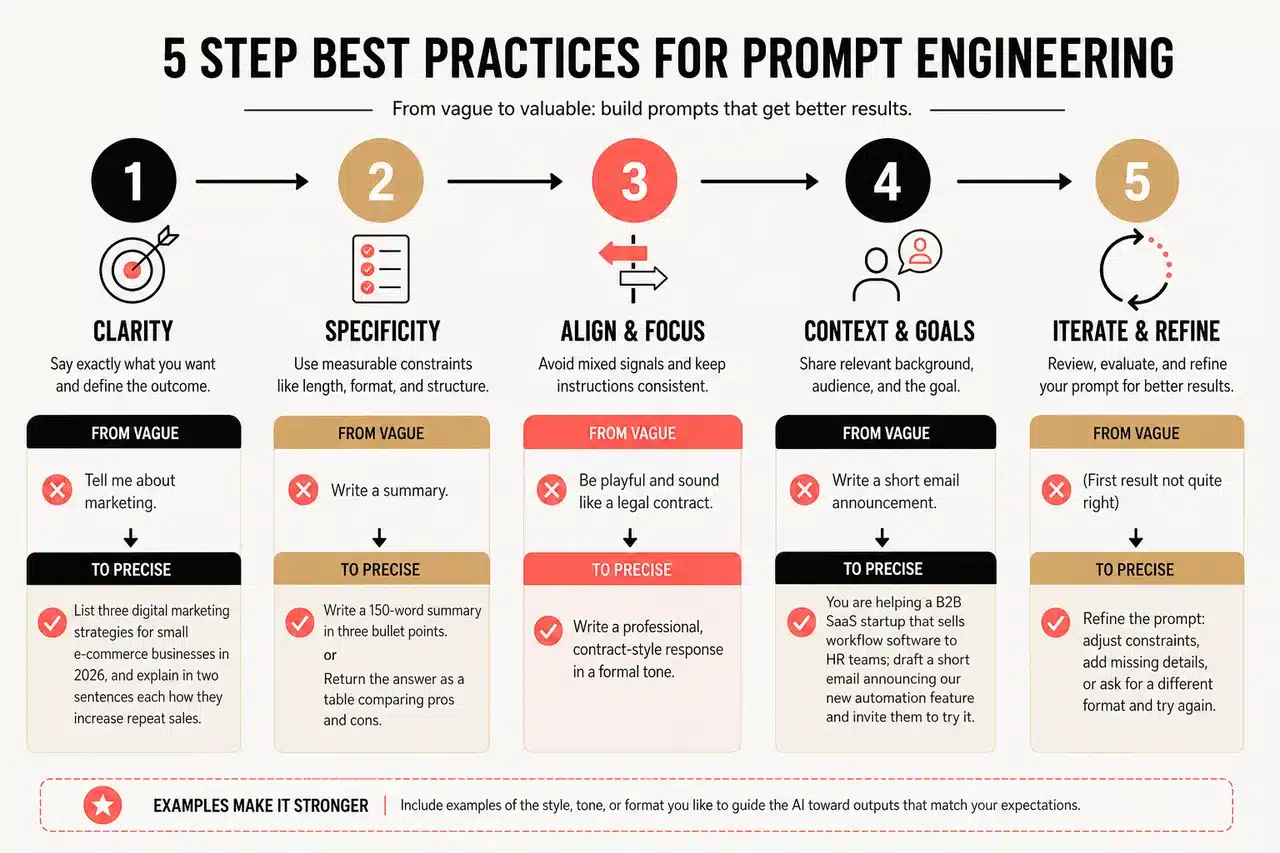
Getting results from AI is much easier when you focus on three simple things: clarity, specificity, and context. Modern research and practitioner guides also highlight iteration, examples, and role-based structure as key ingredients. Here is how you can put these ideas to work, even if you are just starting out.
-
Clarity and Specificity in Prompts
- Say exactly what you want and define the outcome. Ambiguous prompts tend to produce vague answers. Instead of “Tell me about marketing,” try “List three digital marketing strategies for small e commerce businesses in 2026, and explain in two sentences each how they increase repeat sales.” This tells the AI what to cover, who it is for, and how detailed the response should be.
- Use measurable constraints. Include length, format, and structure in your request, such as “Write a 150 word summary in three bullet points” or “Return the answer as a table comparing pros and cons.” Clear constraints help models optimize for your real needs instead of guessing.
- Avoid mixed signals. Combining conflicting instructions like “be playful” and “sound like a legal contract” makes outputs inconsistent. Decide what you want, state it once, and keep the prompt aligned to that choice.
-
Providing Context and Setting Goals
- Share relevant background, not your entire life story. Context can include your industry, audience, and current problem. For instance, “You are helping a B2B SaaS startup that sells workflow software to HR teams; draft a short email announcing a new feature that cuts onboarding time by 20 percent.” This situates the AI in your world without overwhelming it.
- State the goal in plain language. Goals like “Increase demo bookings,” “Reduce customer confusion,” or “Help me decide between two options” give the AI a target to optimize for. A prompt such as “As a customer support agent, draft a polite response to a delayed order complaint that reduces frustration and encourages repeat purchases” tells the model what success looks like.
- Include any constraints or risks. If compliance, privacy, or tone are sensitive, say so up front. For example, “Write a social media post about our healthcare product, avoid medical claims, and keep the tone reassuring and factual.” This simple detail can prevent outputs that would otherwise create legal or reputational risk.
-
Structuring Prompts with Roles and Delimiters
- Assign a clear role to the AI. Role based prompts like “Act as an SEO expert,” “Act as a senior HR consultant,” or “Act as a data analyst” align the voice, level of detail, and priorities of the output. Research and practitioner guides show that role assignment consistently improves relevance because the model selects patterns appropriate to that profession.
- Use delimiters to separate instructions from data. Symbols such as quotes, brackets, or tags make it obvious which text is instructions and which is material to analyze. For instance, “Summarize the following customer reviews in three bullet points. Only use the text inside the triple quotes: « » »[paste reviews] » » ».” This reduces the chance that the model invents details outside your data.
- Structure complex tasks in sections. When you need multiple outputs, break the prompt into numbered steps like “1. List three options. 2. Analyze pros and cons of each. 3. Recommend one option.” ChatGPT 247 handles structured instructions particularly well, turning multi step tasks into clear, ordered responses.
-
Using Examples: Few Shot Prompting for Better Control
- Show the model what “good” looks like. Few shot prompting means including two to five short examples of the input and desired output style in your prompt. For instance, “Here are two examples of product descriptions we like; write a new one in the same style for this new product.” This technique is widely recommended in recent AI guides because it significantly improves consistency.
- Keep examples realistic and varied. Using examples that match your real data and cover different cases helps the AI generalize. For a sales team, that might be several email samples that target different segments but share a common tone.
- Reuse your best examples through ChatGPT 247 libraries. When you find an example set that reliably produces strong results, save it in the platform’s prompt library and reuse it as a template instead of starting from scratch each time.
-
Encouraging Reasoning: Chain of Thought and Step by Step Prompts
- Ask the AI to think out loud when tasks are complex. For planning, troubleshooting, and analysis, you can say “Reason step by step” or “List your assumptions, analyze options, then give a recommendation with trade offs.” Studies on chain of thought prompting show that explicit reasoning often improves accuracy for multi step problems.
- Use reasoning selectively. You do not need step by step explanations for simple tasks like short posts or quick rewrites. Reserve chain of thought instructions for decisions, calculations, or multi factor trade offs, such as “Compare three marketing strategies for a local restaurant and explain which one is most cost effective.”
- Adapt depth to your audience. If you are preparing a board summary, keep the reasoning concise. For internal analysis or training materials, include more detail so colleagues can see the logic behind the recommendation.
-
Iterative Refinement: Treat Prompts as Drafts, Not Final Scripts
- Start simple, then add only what is missing. Many experts suggest writing the shortest prompt that describes your intent, testing it, and then adding only the details that fix specific gaps. This prevents bloated prompts and keeps your instructions focused on what actually matters.
- Adjust one variable at a time. If the output is off, change just tone, or just audience, or just length, and compare results. Over time you will learn which elements have the biggest impact, which turns prompt tweaking into a predictable process rather than trial and error.
- Save your winning prompts in ChatGPT 247. When a prompt consistently delivers strong outcomes, save it to your personal or team library. Users who maintain such a library effectively build a reusable “prompt playbook” that new staff can adopt quickly.
It is a common myth that longer, complicated prompts will get you better answers. In reality, AI works best when your request is straightforward, goal oriented, and well structured.
Common Mistakes in Prompt Engineering and How to Avoid Them
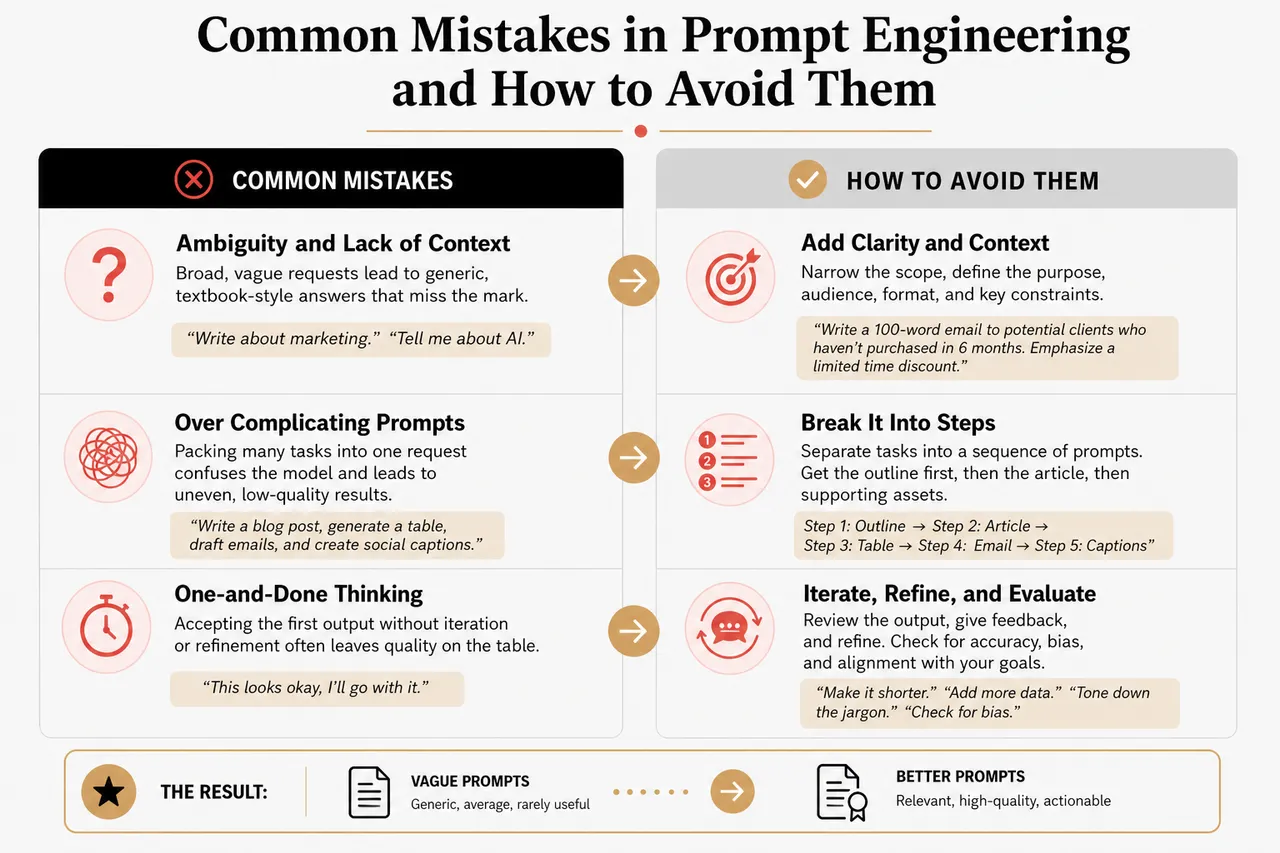
Most prompt problems come from being too vague, missing important context, or packing too much into one request. Research and user communities in 2026 also highlight issues like one and done thinking, unconscious bias, and lack of evaluation. Here is how to avoid the usual pitfalls.
-
Ambiguity and Lack of Context
- Broad prompts create generic answers. Requests like “Write about marketing” or “Tell me about AI” do not specify audience, format, or purpose, so the model produces textbook style content that rarely matches your needs.
- How to fix it: Narrow the scope and define the purpose. For example, “Write a 100 word email introducing our new marketing campaign to potential clients who have not purchased in six months. Emphasize a limited time discount.” The AI now understands what you are trying to achieve and who you are speaking to.
- Connect prompts to real scenarios. If you tell the model that you are, say, “a solo consultant launching a new service,” it will frame advice within your constraints instead of assuming a large enterprise context.
-
Over Complicating Prompts
- Too many instructions in one message cause confusion. Long, cluttered prompts that mix several tasks such as “write a blog post, generate a table, draft emails, and create social captions” in one go tend to produce uneven results. The model tries to satisfy every request and ends up doing none of them well.
- How to fix it: Separate tasks into a sequence of prompts. Ask first for the outline, then for the article, then for the summary, and Lastly for promotional copy. This mirrors how human teams work and gives you a clear checkpoint at each stage.
- Use follow up prompts instead of editing a huge initial prompt. It is often faster to say “Now rewrite that for LinkedIn” or “Turn this into three email subject lines” than to design a single mega prompt that anticipates every future need.
-
One and Done Thinking
- Treating prompts as static limits your results. Many users write one prompt, accept whatever comes back, and move on. This robs them of the opportunity to improve the output through quick iteration, even when the first answer is only close to what they need.
- How to fix it: See every response as version one. Ask “What is missing?” or “Improve this by making it shorter, more persuasive, and more specific to small retailers.” Two or three iterations often turn a decent answer into an excellent one.
- Log your improvements inside ChatGPT 247. By keeping a record of which tweaks lead to better outputs, you build your own informal research base, which is far more relevant to your business than generic advice.
-
Unconscious Bias and Narrow Framing
- Word choice can embed unintended bias. Prompts that implicitly assume a gender, culture, or income level may lead AI to generate content that feels exclusionary or stereotyped, which can damage brand trust.
- How to fix it: Use neutral, inclusive language. For example, replace “Write an ad targeting busy moms” with “Write an ad targeting busy parents and caregivers,” and review outputs for fairness and representation before publishing.
- Leverage AI to check itself. You can ask ChatGPT 247, “Review this content for potential bias or exclusion and suggest neutral alternatives.” This adds a simple but powerful guardrail to your workflow.
-
Ignoring Evaluation and Metrics
- Without measurement, you cannot know if prompts work. If you never track how AI generated emails perform compared to your manual ones, you miss chances to refine prompts that drive better open or click rates.
- How to fix it: Define simple success metrics. For customer support, this might be reduced handling time or fewer follow up questions. For marketing, it could be engagement rates or conversion percentages. Align prompts with these metrics, for example “Write three subject lines optimized for higher open rates among existing customers.”
- Use data to evolve your prompt library. Keep the prompts that correlate with strong performance and retire or adjust those that do not. Over time, this turns ChatGPT 247 into a data informed assistant tuned to your business.
It is easy to assume AI can fill in the blanks, but giving explicit instructions is key, especially when you are handling customer interactions, legal content, or serious business documents.
Practical Prompt Engineering Examples and Templates
Learning is much easier with examples you can use right away. Below are ready made prompts for common business scenarios, showing exactly how structure makes all the difference. You can save and adapt these inside ChatGPT 247 to build your own prompt playbook.
-
Customer Support Example
Prompt: “Act as a customer support agent for an online retail store. Respond politely to a customer who received a damaged product and wants a replacement. Keep the response under 200 words, apologize clearly, explain the replacement process, and reassure the customer that future orders will be handled with extra care.”
Why it works: The role, scenario, tone, length, and key actions are all spelled out, so the AI can deliver a focused and empathetic reply that is ready to copy into your helpdesk. Over time, support teams can adjust this template for different issues like late deliveries or billing questions.
-
Content Creation Example
Prompt: “Act as a content marketer for a mid sized design agency. Write a LinkedIn post announcing our new AI powered image generation tool, built on ChatGPT 247. Highlight its benefits for designers and marketers, including faster mockups, consistent branding, and support for multilingual campaigns. Use a professional but enthusiastic tone and limit the post to 180 words.”
Why it works: The instructions include the platform, the product, the audience, and the benefits, ensuring highly relevant content. By stating the tone and length, you avoid posts that are either too informal or too long for LinkedIn feeds.
-
Data Analysis Example
Prompt: “Act as a data analyst. I will paste monthly sales data for our online store inside triple quotes. Analyze this sales data and summarize the top three trends in plain English, focusing on product categories and regions. Then suggest two practical actions to increase revenue next quarter. Use short paragraphs and avoid technical jargon.”
Why it works: The AI knows the task, the format, the focus, and the audience. It is guided to produce insights that a non technical manager can understand and act on, turning raw numbers into strategic decisions.
-
Internal Documentation Example
Prompt: “Act as a technical writer. Rewrite the following process description so that new employees without technical backgrounds can follow it. Use numbered steps, keep each step under three sentences, and highlight any warnings or prerequisites. Text to rewrite is inside triple quotes: « » »[paste process] » » ».”
Why it works: The prompt specifies structure, audience, and constraints, which helps the AI transform complex internal notes into clear onboarding documentation.
-
Idea Generation Example
Prompt: “You are a growth strategist for a local service business using ChatGPT 247. Generate five marketing ideas that require a small budget but can realistically be implemented within one month. For each idea, explain the expected impact, approximate effort level, and how AI can help execute it, such as drafting copy or automating replies.”
Why it works: Rather than asking “Give me marketing ideas,” this prompt adds constraints on budget, timeline, and format, and explicitly asks the model to connect ideas to AI capabilities, which makes outputs more practical.
Leveraging ChatGPT 247 and AI Tools for Prompt Engineering Success
With platforms like ChatGPT 247, prompt engineering gets much simpler even if you are new to AI. The platform is designed as a comprehensive environment for exploring AI technologies, guiding you from first experiments to robust, repeatable workflows.
-
Prompt Libraries
ChatGPT 247 offers curated prompt libraries covering common business needs such as customer support, marketing, HR, and operations. Instead of starting with a blank page, you can pick a template close to your goal, adjust the audience or tone, and run it immediately. This dramatically reduces the learning curve for teams that are just beginning to use AI.
-
Real Time Feedback and Iteration Support
The platform provides real time suggestions that help you sharpen your prompts for better results, such as recommending clearer goals or more specific formats. By encouraging quick iteration and highlighting effective patterns, ChatGPT 247 turns good prompts into great ones through short cycles of testing and refinement.
-
Community Templates and Shared Playbooks
A growing pool of community templates lets users see how others solve similar problems, from outreach campaigns to onboarding flows. You can adapt these proven prompts to your own projects, saving hours of experimentation. Over time, this shared knowledge evolves into industry specific playbooks that non technical users can apply with confidence.
-
AI Chatbot Integration
ChatGPT 247 makes it straightforward to connect your best prompts to chatbots that handle customer queries around the clock. For example, a retailer can use a set of prompts for returns, shipping questions, and product recommendations, then plug them into a chatbot that reflects the brand’s tone and policies consistently.
-
Image Generation Tools
Integrated image generation lets marketers and designers turn clear, structured prompts into visuals for campaigns, presentations, and social media. A prompt like “Create a minimal, modern banner showing our ChatGPT 247 logo with the text ‘AI assistance, 24/7’ in blue and white” ensures the tool knows exactly what to produce, even for non designers.
-
Automated Translation Services
For businesses expanding internationally, ChatGPT 247 supports multilingual workflows by combining translation with cultural adaptation. You can prompt the AI to “Translate this FAQ into Spanish and adapt examples to a Latin American audience,” which helps content resonate with local customers instead of sounding like a direct, literal translation.
-
SEO Optimization Assistance
The platform can assist in crafting keyword aware prompts, such as “Write a blog introduction optimized for the keyword ‘ai prompt engineering best practices’ aimed at small business owners.” This guides the AI to produce content more likely to align with search intent, making your website easier to discover.
-
FAQ Automation
ChatGPT 247 helps you instantly create or update FAQs with targeted prompts. For example, “Read these support transcripts and generate ten common questions with clear answers suitable for our help center.” This reduces repetitive work and keeps your knowledge base aligned with what customers actually ask.
Building your prompt engineering skills is easier and faster when you use these platform features and connect with the community. You do not have to go it alone; there is a whole ecosystem designed to help you learn and succeed.
Data Driven View: Why Better Prompts Matter For Productivity
Beyond examples and tips, it helps to understand how better prompts translate into measurable gains. Recent reports from technology companies, consultancies, and academic studies show that structured, context rich prompts can significantly impact productivity and quality.
Productivity, Adoption, and Business Impact
Studies of generative AI usage in office settings report time savings between 20 and 40 percent for tasks like drafting emails, preparing reports, and summarizing documents. In practice, this means a marketing specialist who spends three hours per day writing could reclaim roughly an hour simply by using well designed prompts instead of ad hoc requests. At scale, teams that standardize prompts inside platforms like ChatGPT 247 can multiply these gains across dozens of employees.
- Improved task completion speed. Controlled experiments with knowledge workers found that AI assistance, guided by clear prompts, allowed participants to complete certain writing and data tasks significantly faster, without reducing quality. When prompts were vague, the time savings dropped and editing demands increased.
- Higher satisfaction among non technical users. Surveys across large language model platforms indicate that users who rely on prompt templates and role based instructions report more consistent outputs and less frustration than those who “just type something” into the chat box. This aligns directly with ChatGPT 247’s focus on accessible templates and guided workflows.
- Broader adoption in small and medium businesses. Market research suggests that small and medium enterprises are rapidly experimenting with AI for marketing, support, and internal documentation. However, many stall when early outputs feel generic. Prompt engineering best practices bridge this gap and help these businesses move from trials to embedded AI use.
Summary Table: Prompt Quality And Outcomes
| Prompt Quality | Typical Outcome | Time Spent Editing | Business Impact |
|---|---|---|---|
| Vague, no context | Generic, unfocused responses that only partially match the need | High, often more than half the task time spent fixing content | Limited; AI feels unreliable and is used only occasionally |
| Moderately clear but unstructured | Useful but inconsistent outputs, varying by task and user | Medium; some prompts work, others require rework | Incremental; AI helps with simple tasks but not complex workflows |
| Clear, contextual, role based with examples | Consistent, high quality responses aligned with goals and audience | Low; minor tweaks rather than major rewrites | Strong; AI becomes a core productivity tool across the business |
Advanced Yet Accessible Techniques For Non Technical Users
While many advanced prompt engineering techniques are discussed in technical circles, several can be applied by non technical users in everyday work. ChatGPT 247 incorporates these ideas into workflows so you can use them without needing to understand the math behind AI models.
Context Engineering Without Complexity
Context engineering is the practice of deliberately selecting which information the AI sees and in what order. For non technical users, this can be as simple as separating static instructions (“You are our brand voice”) from variable data (“Here is today’s campaign brief”) and keeping important details near the beginning or end of the prompt so they are not lost in the middle. ChatGPT 247 helps manage this through reusable system messages and clear input fields.
Positive Framing And Clear Constraints
Guides published in 2026 emphasize that telling models what to do is often more effective than telling them what not to do. Instead of “Do not use technical jargon,” say “Use simple, everyday language that a non specialist can understand.” This reduces the chance that the AI dwells on the unwanted behavior. Adopting positive framing in your prompts is a small shift that can noticeably improve outputs.
Model Awareness And Adaptation
Different language models can respond slightly differently to the same prompt. Non technical users do not need to study every model, but they benefit from noticing patterns such as how a particular model handles lists or tables. ChatGPT 247 abstracts much of this complexity, yet it still allows users to choose suitable models for tasks like creative writing, structured data output, or multilingual content, and to adapt prompts accordingly.
Mastering Prompt Engineering in 2026: Your Next Moves
Putting these AI prompt engineering best practices to work can transform the way you use AI in your business and personal life. When you focus on clarity, specificity, and context, and you embrace iteration and examples, you set yourself up for reliable, high quality results. With tools like ready to use templates and supportive platform features, getting started is easier than ever.
- Keep practicing and vary your prompt styles. Experience leads to mastery. Try role based prompts for some tasks, few shot prompts for others, and chain of thought prompts when you need deeper reasoning. Over weeks and months, you will develop a personal style that reliably produces the outcomes you care about.
- Take advantage of templates and community resources. Prompt libraries and shared examples save time and spark new ideas, especially when you are facing an unfamiliar problem. Instead of reinventing the wheel, start from a template inside ChatGPT 247 and adapt it to your context.
- Explore everything ChatGPT 247 has to offer. From chatbot integration to image generation and multilingual support, the platform is built to help individuals and businesses scale their results. The more you connect prompts to real workflows, the more value you unlock from AI.
Prompt engineering is not just for tech experts anymore. The skills you build now will pay off in efficiency, creativity, and business growth. Dive in, experiment with new techniques, and join the ChatGPT 247 community to keep your skills sharp and your AI results on point. The future of AI success is in your hands, one well crafted prompt at a time.