
Knowledge workers lose an average of 12 hours every week to repetitive tasks that AI could handle in minutes. You’re probably among them, toggling between apps, reformatting data, or rewriting the same type of email for the hundredth time. The frustration isn’t just about lost hours; it’s about never reaching the creative, strategic work that actually moves your career forward.
ChatGPT 247 helps individuals and businesses automate these pain points with practical AI workflows that integrate seamlessly into your daily routine. This guide walks you through five specific automation ideas you can implement today, each designed to reclaim hours without requiring technical expertise.
Understanding AI Productivity Workflows: Concepts and Benefits
In 2026, AI productivity workflows have become a game changer for knowledge workers. These workflows are structured sets of tasks that AI automates and optimizes, reshaping the way professionals handle research, communication, project management, and information processing.
Key Components of AI Workflows
Effective AI productivity workflows for knowledge workers revolve around three essential building blocks:
- Automation Tools: These are apps that replace repetitive, manual actions like pulling data from reports, sorting emails, or generating routine documents. For instance, instead of manually searching for new leads, an AI tool can scan your CRM and compile a daily list automatically. In 2026, tools such as ChatGPT, Notion AI, Zapier AI, and Microsoft Copilot are widely used to handle content drafting, data movement, and routine analysis so that knowledge workers spend far less time on low value tasks.
- Orchestration Platforms: Think of these as conductors, coordinating multiple automated tasks so everything runs smoothly from start to finish. They ensure each step in your workflow triggers the next, such as syncing new leads from your CRM directly to your email platform for follow up. Modern AI agents can now search across multiple systems, pull full content from documents, synthesize findings into summaries, and push structured outputs into project or CRM tools without human intervention, which turns scattered processes into unified flows.
- Integration Layers: These connectors let your favorite tools talk to each other. ChatGPT 247, for example, can pull data from spreadsheets, interact with communication apps, or connect with project management tools so all your data and actions stay linked. Integration layers such as Zapier AI or native APIs in productivity suites reduce the need to copy paste between apps and make it possible to answer natural language questions about live data in your workspace.
Even complex processes like literature reviews or customer support can now be automated, all without needing to code or hire a developer. AI agents can search across multiple sources, identify conflicting information, and surface the most relevant insights in a structured way, which is particularly powerful for analysts, consultants, and researchers who previously had to manually compile and reconcile information.
Benefits for Knowledge Workers
- Time Savings: Tasks that once took hours, like compiling research or sorting emails, are now done in a matter of minutes, giving you more space for the work that matters most. Industry deployments in 2026 report 50 percent faster research synthesis, 4 to 8 hours per week saved in reporting cycles, and 60 to 80 percent reductions in contract review time when repetitive document work is automated. For many knowledge workers, reclaiming even a fraction of those hours each week means more time for strategy, clients, and deep thinking.
- Accuracy and Consistency: Automated workflows remove the risk of human error and ensure your outputs are always on brand and up to standard. AI systems excel at following rules and templates, so tasks like contract checks, compliance wording, and report formatting become more reliable. When ChatGPT 247 generates drafts using your approved patterns, you reduce the variability that often creeps in when people are rushed or juggling multiple tasks.
- Scalability: As your workload grows, AI workflows can handle the extra demand without needing more people or extra manual effort. A single AI agent can summarize hundreds of documents, triage thousands of emails, or process large volumes of CRM updates with consistent quality. This scalability is why businesses using AI productivity tools in 2026 gain a clear advantage in speed and throughput compared with teams that still rely on manual coordination.
- Innovation Enablement: With routine work out of the way, you have more energy and time for brainstorming, problem solving, and professional development. Studies and industry reports describe AI as a tool for augmentation: systems absorb repetitive or data heavy tasks so humans can focus on judgement, creativity, and collaboration. When ChatGPT 247 handles repetitive drafting or summarization, you can redirect effort into designing better services, exploring new markets, or learning new skills.
It is no longer just tech experts who can benefit from AI productivity workflows. Platforms like ChatGPT 247 make it easy for anyone to get started, thanks to user friendly templates, intuitive dashboards, and guided prompts that hide the complexity of AI behind straightforward natural language. The most effective organizations in 2026 are not the ones that simply add AI on top of existing processes, but those that redesign workflows around these capabilities so that humans and AI collaborate smoothly.
5 AI Workflow Ideas for Knowledge Workers
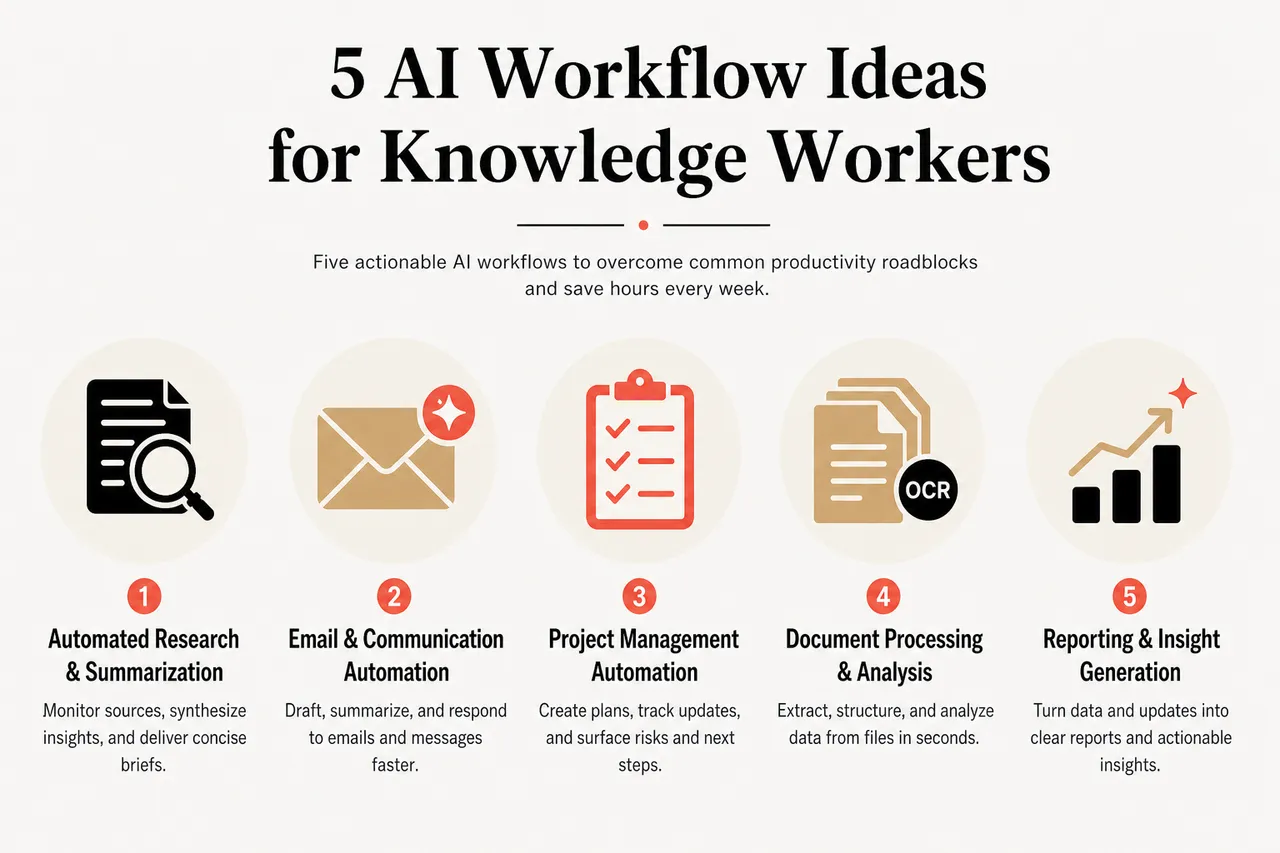
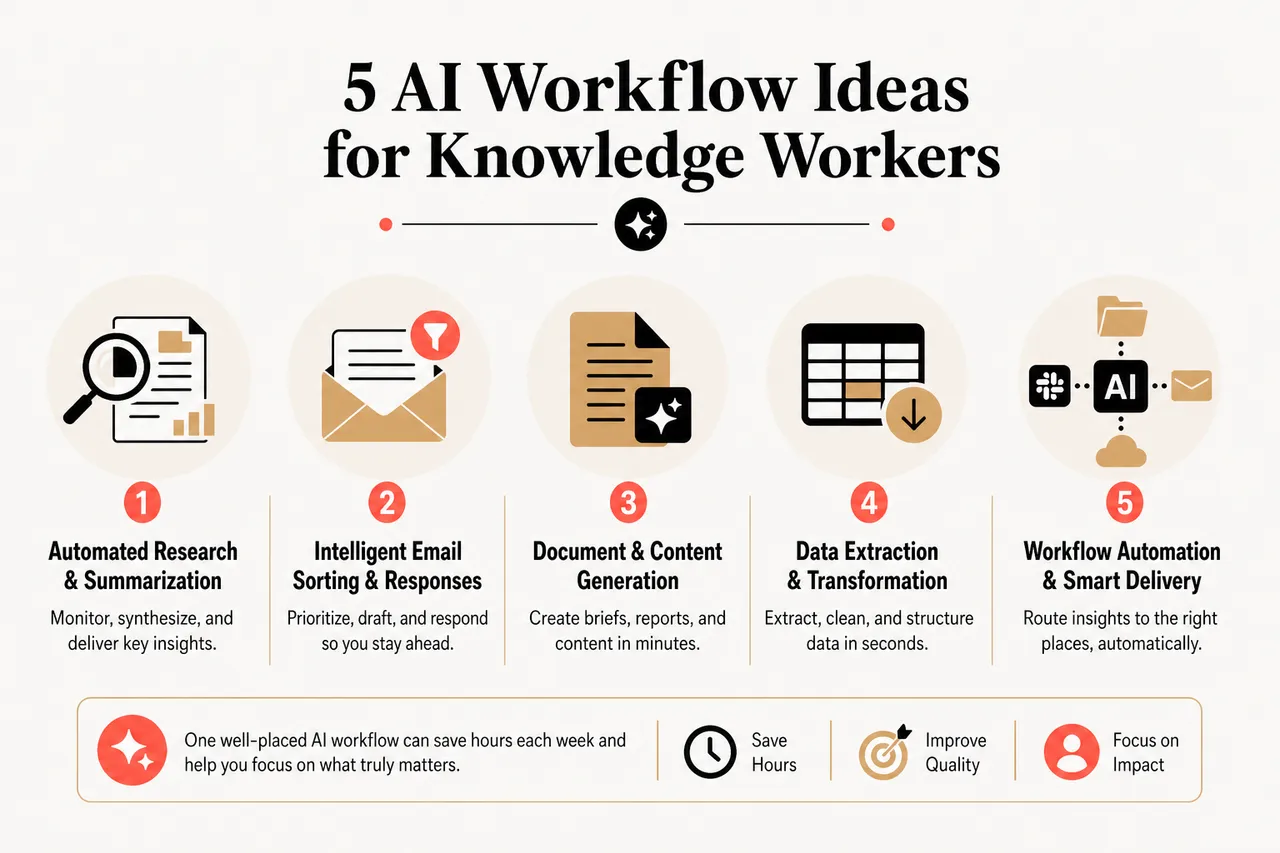
Even one well placed AI workflow can unlock hours each week and boost your quality of work. Here are five actionable ideas tailored to common productivity roadblocks, ready for you to try today using ChatGPT 247 and complementary tools.
1. Automated Research and Summarization
Think about not having to sift through dozens of articles or reports every time you prepare for a meeting or draft a strategy document. With AI driven research workflows, you can turn scattered information into reliable, concise briefs.
- Continuous monitoring and synthesis: Set up ChatGPT 247 to watch industry news feeds, academic journals, regulatory updates, or your internal knowledge base for the latest information. Instead of checking each source manually, the AI agent pulls relevant content, identifies key developments, and compiles structured updates into a daily or weekly digest, with clear sections for implications, risks, and opportunities.
- Structured answers to specific questions: Start each research task with a well defined question, then ask ChatGPT 247 to synthesize information and provide a structured answer with headings, bullet points, and follow up questions. You can have the AI search across multiple pages or documents, highlight conflicting viewpoints, and recommend which claims should be verified with human review, which reduces the time you spend reconciling sources.
- Smart delivery into your workflow: Send these AI generated summaries straight to project folders, shared drives, Slack channels, or personal dashboards so they appear where your team already works. For instance, you can route competitive intelligence updates to a marketing channel, regulatory changes to an operations board, and technical insights to a product team space, all triggered automatically by ChatGPT 247.
What used to be a two hour research session can often be reduced to minutes when the AI handles the first pass of reading and structuring information. Knowledge workers using such research agents report around 50 percent faster synthesis, which means they can cover more ground without extending working hours.
2. AI Powered Content Generation and Editing
Writing does not have to be a time sink, even for complex or sensitive topics. Generative AI tools like ChatGPT 247 can help you create and refine content quickly while keeping it aligned with your brand and goals.
- Draft first versions in your voice: Have ChatGPT 247 produce initial drafts of emails, reports, proposals, or policy documents using examples of your preferred tone and structure. By feeding the AI a few past pieces of content and explicit style guidelines, you can create a reusable prompt template that captures your communication standards and generates drafts that are much closer to what you would write yourself.
- Layer smart editing and compliance checks: Use AI editing tools to review drafts for clarity, grammar, and adherence to brand or legal requirements. ChatGPT 247 can flag ambiguous sentences, suggest more precise wording, and ensure key phrases or disclaimers appear where required, which is particularly valuable in fields like legal, consulting, or financial services where consistency and accuracy are critical.
- Repurpose content across formats: Effortlessly transform long form content into formats tailored to different audiences. You can ask ChatGPT 247 to convert a detailed report into a three point executive summary, a blog post, a slide deck outline, or even a FAQ for non technical users. This kind of content transformation is now routine in 2026 and helps teams maintain coherent messaging without rewriting material from scratch.
Whether you work in legal, consulting, marketing, product, or education, this workflow can shave substantial time off your week and keep your communication sharper. Many teams report 4 to 8 hours saved per week in writing and reporting alone once they adopt AI drafting and transformation workflows.
3. Smart Meeting Management
Meetings become more productive and less stressful when AI supports the entire lifecycle from scheduling to follow up. Instead of spending time coordinating calendars or manually typing notes, you can let AI handle the logistics and focus on decisions.
- Intelligent scheduling and invites: Let AI powered assistants propose meeting times and send invitations based on everyone’s calendars and preferences. ChatGPT 247 can integrate with your calendar system, suggest optimal slots that minimize context switching, and generate agenda placeholders, which reduces the back and forth emails and helps protect focus time.
- Automatic agendas, notes, and summaries: Use AI tools connected to your meeting platform to generate agendas based on previous threads or documents, capture real time notes, and produce concise summaries of decisions and discussions. Many teams already rely on transcription tools for raw notes; the higher value workflow is having ChatGPT 247 extract decisions, action items, owners, deadlines, and open questions, then present them in a structured format.
- Action item syncing into project tools: Assign action items and deadlines during the meeting and sync them instantly with your project management tools, ticketing systems, or CRM. AI agents can detect commitments made in the conversation, create tasks with due dates, and route them to the right boards or assignees so that nothing is lost between the meeting and execution.
Teams using these tools see fewer missed follow ups and clearer meeting outcomes, which directly reduces the number of recurring status meetings needed. Meeting oriented agents deployed in real organizations are already saving several hours per week for leaders by removing the manual burden of note taking and coordination.
4. Project Management Automation
AI enabled project management platforms help teams coordinate complex work without drowning in updates and manual tracking. For knowledge workers running cross functional projects, these workflows turn scattered information into a single, reliable view of progress.
- Smart task assignment and load balancing: Automatically assign tasks based on team members’ strengths, historical performance, and current workloads. ChatGPT 247 and AI enhanced task managers can analyze who has capacity, which skills each task requires, and how to distribute work to avoid bottlenecks, which reduces the time project leads spend reshuffling assignments.
- Proactive risk and delay detection: Keep an eye on progress and flag potential delays before they become critical problems. AI can monitor task status, past patterns, and dependencies, then warn project managers about likely slippage or overloaded team members. Tools in 2026 increasingly include risk prediction features that surface issues days earlier than traditional manual reviews.
- Status reports generated on schedule: Compile and share status reports with stakeholders without manual copy paste from multiple tools. AI agents can pull updates from Jira, ticketing systems, documentation, and Slack, then generate coherent progress summaries for different audiences, such as executives, clients, or technical teams. Many deployments report 4 to 8 hours per week saved on reporting through this kind of automation.
- Unified workflows across systems: Integrate seamlessly with your CRM, ticketing, and documentation systems for smooth handoffs. ChatGPT 247 can act as the orchestration layer that ties together updates, documents, and communication so that anyone can ask a natural language question like “What is the current status of Project X and what are the main risks?” and get an answer grounded in live data.
With these systems in place, project leads can concentrate on strategy, stakeholder management, and problem solving while routine oversight runs itself. Organizations that use AI orchestration for project management report 20 percent faster project delivery and more consistent on time performance.
5. Automated Communication and FAQ Handling
Answering the same questions repeatedly is a major source of friction for many teams. AI can help streamline both external and internal communication so people get fast answers while experts focus on unique or high value queries.
- Chatbots for frequently asked questions: Implement AI chatbots on your website, help center, or internal portal to handle common questions about products, policies, or processes. ChatGPT 247 can be trained on your documentation and knowledge base to offer accurate, friendly responses around the clock, which reduces email volume and makes information easier to access for customers and employees.
- Smart escalation for complex issues: Automatically escalate complex or unusual queries to the right expert, with full context attached. When the AI detects that a question falls outside its trained patterns, it can create a ticket containing the conversation, relevant documents, and suggested next steps, then route it to a human specialist. This ensures that users do not feel ignored and that experts receive well structured information instead of vague requests.
- Automated drafting and routing of routine emails: Draft responses to standard emails, personalize follow ups, and route messages to the correct team using AI powered classification. ChatGPT 247 can categorize incoming messages, propose replies that fit your tone and policies, and suggest when to follow up or close a conversation, which reduces response times and lightens the administrative load on your staff.
By reducing response times and shifting repetitive questions to automated channels, these workflows improve satisfaction for both staff and clients. Document processing and FAQ handling are among the highest consistency return on investment starting points in 2026, with many organizations reporting substantial reductions in support backlogs once they adopt AI communication agents.
Case Studies: Real World Impact of AI on Knowledge Worker Productivity
Organizations that have embraced AI productivity workflows for knowledge workers are already seeing measurable results across industries. The most successful teams redesign workflows around AI capabilities rather than simply layering tools on top of old processes.
Case Study: AI Driven Research in Consulting
A global consulting firm introduced an AI workflow generator to handle research tasks for client engagements. Automated literature reviews and data gathering cut project preparation time by around 30 percent, letting consultants spend more time refining recommendations and client strategies. Instead of manually scanning dozens of reports, consultants now receive AI generated briefs with key findings, conflicting viewpoints, and citations to verify.
Team members reported higher job satisfaction and less fatigue from repetitive information gathering. With routine synthesis handled by AI, consultants used ChatGPT 247 to explore alternate scenarios, design workshops, and test messaging with clients. The firm also noted improvements in consistency, because the AI applied the same research structure across projects rather than relying on individual habits.
Case Study: AI Orchestration in Project Management
At a mid sized marketing agency, AI powered project management tools transformed the way campaigns moved forward. Routine progress updates, task tracking, and internal communication all became automated, with an AI agent aggregating status information from creative tools, task boards, and email threads into a single weekly summary. Project delivery sped up by around 20 percent, deadlines were met more consistently, and cross department collaboration improved because everyone had access to the same structured view of progress.
This efficiency helped the agency increase client retention and win new business. Leaders highlighted the shift from reactive firefighting to proactive risk management as the key benefit: AI surfaced potential delays early, giving teams time to adjust. They also used ChatGPT 247 to generate tailored client updates from the same underlying data, which reduced reporting overhead.
Across sectors, industry analysts project that teams using AI productivity workflows in 2026 are seeing up to 25 percent faster completion times and around a 40 percent boost in output quality, particularly in document heavy roles like legal, finance, research, and consulting. Some deployments report 60 to 80 percent reductions in specific task times, such as contract review or invoice extraction, when workflows are redesigned around AI agents.
| Workflow Type | Typical Time Savings | Main Benefit for Knowledge Workers |
|---|---|---|
| Document processing (contracts, invoices, reports) | 60-80 percent reduction in task time | Less manual review and data entry, more focus on negotiation and analysis |
| Research synthesis and competitive intelligence | Around 50 percent faster synthesis | Broader coverage of sources, faster preparation for decisions and client work |
| Reporting and status updates | 4-8 hours saved per week | Reduced coordination tax, more time for deep work and stakeholder engagement |
| Project management orchestration | Around 20-25 percent faster delivery | Fewer missed deadlines, better risk visibility, smoother collaboration |
Best Practices and Tips for Implementing AI Workflows
Getting the most from AI productivity workflows comes down to thoughtful planning and steady improvement. The organizations seeing the strongest results in 2026 are those that start with high volume, repetitive processes and then scale AI adoption once they have proven value and trust.
Choosing the Right AI Tools
- Prioritize integration with your existing systems: Look for tools that work well with your current CRMs, communication platforms, project management solutions, and document repositories. ChatGPT 247, for example, connects with popular productivity suites and can act as an orchestrator for content, tasks, and communication, which reduces friction and lowers the learning curve.
- Assess usability, support, and customization: Consider how easy the platform is to use for non technical staff, the quality of documentation and support, and the flexibility to design workflows without writing code. Tools with clear templates, guided prompts, and visual workflow builders tend to drive faster adoption because they help users experiment safely.
- Test multiple options for specific needs: Try out a few tools or configurations to see which one fits your workflow and team needs. For instance, you might pair ChatGPT 247 for text heavy tasks with a specialized data analysis agent for spreadsheet work and an AI enhanced task manager for project tracking, letting each tool play to its strengths.
Customizing Workflows for Maximum Impact
- Map current processes and identify high value targets: Start by documenting how work happens today and highlighting steps that are repetitive, error prone, or slow. Look for processes with high volumes, such as weekly reporting, recurring research tasks, or document review, because automating these flows with ChatGPT 247 is likely to produce clear return on investment.
- Co design workflows with the people who use them: Get your team involved in shaping AI workflows so they are practical, relevant, and aligned with real constraints. Ask knowledge workers where they lose the most time, then collaborate on prompt templates, escalation rules, and integration points. This co design approach increases buy in and surfaces edge cases early.
- Continuously refine based on data and feedback: Keep workflows up to date as your business evolves, using performance metrics and user feedback to adjust. Track indicators such as turnaround times, error rates, and satisfaction scores, and have ChatGPT 247 help analyze logs to suggest improvements, such as new templates or routing rules.
Change Management and Ongoing Evaluation
- Communicate clearly and address concerns: Explain how AI workflows will benefit the team, what tasks will change, and where human judgement remains essential. Many workers worry about job impact, so it is important to emphasize that ChatGPT 247 and similar tools are designed to absorb repetitive work so people can focus on higher value activities.
- Provide hands on training and documentation: Offer practical training sessions, internal guides, and example prompts to make adoption easier. Demonstrating a few high impact workflows live, such as automated research or meeting summarization, helps people see the value quickly and reduces resistance.
- Measure outcomes and iterate: Define what success looks like in terms of time saved, error reduction, or quality improvements, then measure results regularly. Use these metrics to fine tune workflows, retire ineffective automations, and expand proven ones. Over time, you can build a portfolio of AI workflows that collectively transform how your organization operates.
Strategic Considerations: Designing AI Native Workflows
Beyond tools and quick wins, many organizations in 2026 are recognizing that the biggest gains come from rethinking workflows altogether. Instead of simply adding AI assistants to existing processes, they design AI native flows where automation and human judgement are intentionally combined.
Rethinking Processes Around AI Capabilities
Redesigning a workflow around AI means identifying which steps are rules based and repetitive, which require nuanced judgement, and how information should flow between systems. For example, a contract review process might shift from humans scanning full documents to AI agents extracting key terms, highlighting anomalies, and routing edge cases to specialists. ChatGPT 247 can support this redesign by helping map current steps, propose automated alternatives, and simulate new flows before they go live.
Balancing Automation and Human Oversight
Effective AI workflows treat AI agents as a digital workforce that handles high volume, consistent tasks while humans supervise and intervene at critical points. This balance is really important for trust and quality: AI can draft, analyze, and triage, but humans confirm decisions that carry significant risk or require empathy. With ChatGPT 247, you can explicitly define which outputs must be reviewed, which can be auto approved, and how escalation paths work when the AI is uncertain.
Data Readiness and Governance
AI workflows depend on clean, accessible data. Before deploying complex automations, organizations are investing in better data architectures, access controls, and documentation. This ensures that ChatGPT 247 and other agents can access the right information with appropriate safeguards, and that outputs comply with privacy and security requirements. Clear governance also helps teams understand where AI is used, how decisions are made, and how to audit results when necessary.
Key Data Points: AI Productivity for Knowledge Workers
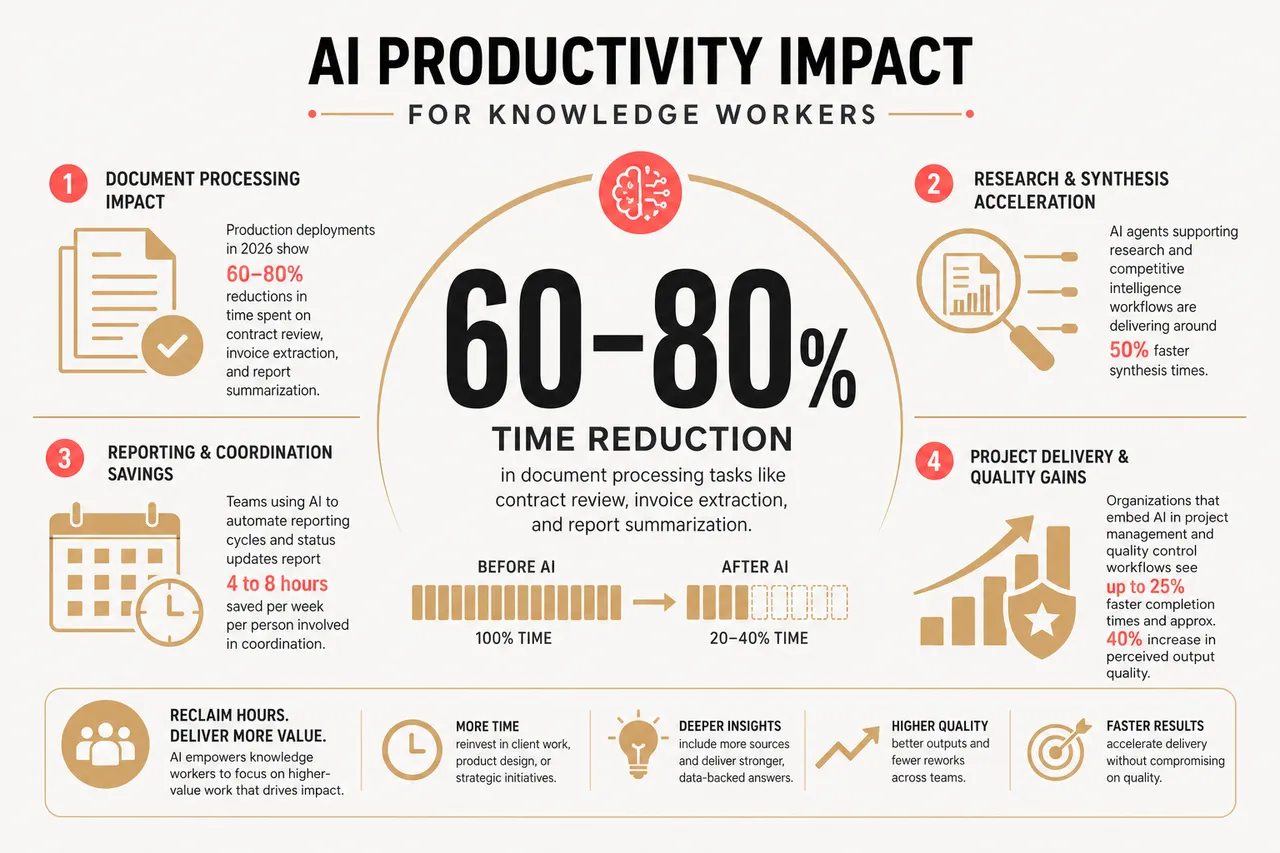
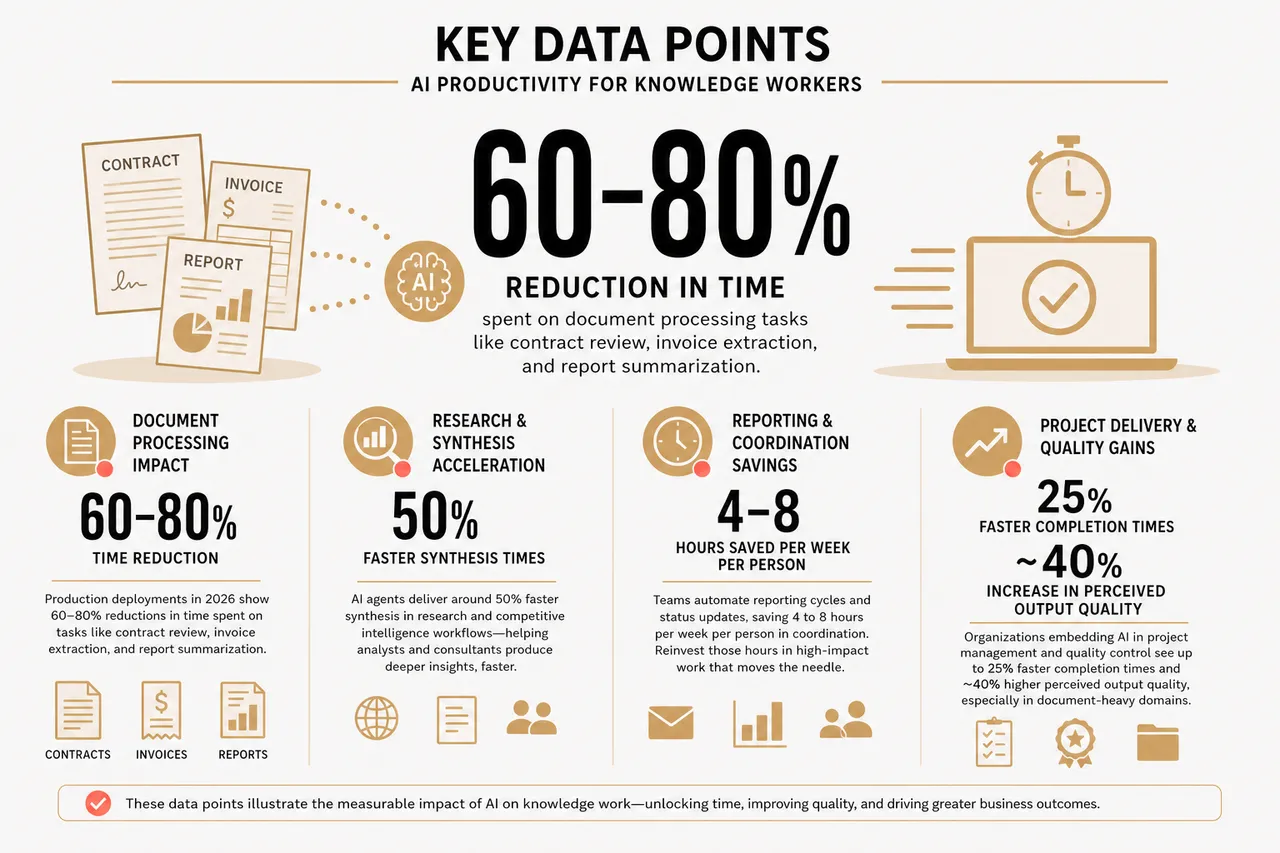
Recent reports and industry analyses provide concrete numbers that illustrate how AI is reshaping knowledge work. Integrating these data points into your planning can help you make realistic projections and build stronger business cases for AI initiatives with ChatGPT 247.
- Document processing impact: Production deployments in 2026 show 60-80 percent reductions in time spent on tasks like contract review, invoice extraction, and report summarization. In practice, this means that a legal team handling hundreds of contracts per month can free up significant capacity for negotiation and client advisory work.
- Research and synthesis acceleration: AI agents supporting research and competitive intelligence workflows are delivering around 50 percent faster synthesis times. Analysts and consultants can now prepare briefs and strategy papers faster while including more sources, which improves both speed and depth of insight.
- Reporting and coordination savings: Teams using AI to automate reporting cycles and status updates report 4 to 8 hours saved per week per person involved in coordination. Those hours can be reinvested into client work, product design, or internal improvements instead of assembling slide decks and emails.
- Project delivery and quality gains: Organizations that embed AI in project management and quality control workflows see up to 25 percent faster completion times and approximately a 40 percent increase in perceived output quality, especially in document heavy domains. Better quality at higher speed strengthens client relationships and competitive positioning.
- High volume automation examples: One reported case describes an AI powered workflow handling more than 60,000 requests annually for lab supplies, cutting manual ordering time from up to 30 minutes to seconds and saving roughly 30,000 hours per year
| Metric | Typical Value in 2026 | Implication for Knowledge Workers |
|---|---|---|
| Time lost to repetitive tasks | 12 hours per week on average | Large opportunity for AI workflows like those in ChatGPT 247 to reclaim time |
| Contract and document review time reduction | 60-80 percent | More capacity for strategic legal work and risk analysis |
| Research synthesis speed improvement | Around 50 percent | Faster preparation for decisions and client deliverables |
| Weekly reporting time saved | 4-8 hours per person | Less coordination overhead, more deep work and client time |
| Generally task completion speed increase with AI workflows | Up to 25 percent | Shorter turnaround times and greater responsiveness to change |
Frequently Asked Questions About AI Workflows for Knowledge Workers
How can I start using AI workflows if my team has never used these tools before?
The most effective approach is to pick one high volume, repetitive process, such as weekly reporting or research summarization, and implement a small, well defined workflow using ChatGPT 247. Provide clear examples, templates, and a way to measure time saved. Once people see tangible benefits, you can expand to additional workflows with stronger support and less resistance.
Do AI workflows like those in ChatGPT 247 replace jobs or change them?
Current evidence suggests that AI workflows primarily reshape jobs by removing repetitive tasks rather than eliminating roles outright for most knowledge workers. Systems handle routine drafting, data extraction, and coordination, while humans focus more on judgement, creativity, and relationship building. It is important to communicate this shift clearly and involve employees in designing the workflows that support their work.
What are the biggest risks when adopting AI productivity workflows?
Common risks include poor data quality, unclear ownership of AI outputs, over reliance on automation without sufficient oversight, and workflows that do not align with real user needs. Mitigating these risks requires good data governance, explicit review and escalation rules, and iterative design with user feedback. ChatGPT 247 can help by providing transparent prompts, logs, and configuration options that make it easier to audit and adjust workflows over time.
AI productivity workflows for knowledge workers are no longer a distant promise in 2026. By combining tools like ChatGPT 247 with thoughtful workflow design, organizations and individuals can reclaim many of the 12 hours lost each week to repetitive tasks and convert them into time spent on creative, strategic, and high impact work. The next leap in productivity is not just about adopting AI; it is about building workflows where humans and AI work together in ways that make knowledge work more effective and more satisfying.