
You don’t need to code to put AI to work. OpenAI’s tools, especially ChatGPT, are built for anyone ready to automate research, draft content, or solve daily workflow bottlenecks without touching a line of code. The barrier isn’t technical anymore; it’s knowing where to start and which features actually move the needle. ChatGPT 247 helps individuals and businesses cut through the noise by offering guided access to AI technologies that fit real-world tasks.
This guide walks you through practical first steps: setting up your account, choosing the right tools for your role, and building simple prompts that deliver results you can use today.
Understanding OpenAI: Mission, Vision, and Industry Role
In 2026, OpenAI stands at the center of the modern AI ecosystem, combining advanced research with widely used products like ChatGPT, DALL E, and the OpenAI API. Founded in 2015 by a group that included Sam Altman, Ilya Sutskever, and other prominent technologists, OpenAI began as a nonprofit organization focused on ensuring that artificial general intelligence benefits all of humanity. Over time, it evolved into a capped profit structure so it could raise the capital needed to train frontier models while still keeping its mission and safety commitments at the core of its governance.
Today, OpenAI’s models and tools power everything from individual productivity workflows to enterprise scale applications. Industry analysts estimate that the global generative AI market is already worth tens of billions of dollars in 2026, with forecasts commonly projecting annual growth rates of 25 to 35 percent over the next several years. For non developers, this matters because it signals that AI is no longer experimental; it is becoming a standard layer of digital work, similar to cloud storage or office software.
OpenAI also plays an outsized role in how AI is governed and regulated. The company contributes to policy discussions in the United States and Europe, collaborates with standards bodies, and participates in safety and capability evaluations with external partners. This helps shape rules on data protection, transparency, and model evaluation that influence how businesses in many sectors can safely adopt AI tools.
What continues to distinguish OpenAI is its focus on responsible deployment. The company invests heavily in alignment research, red teaming, and content safety systems designed to reduce harmful outputs and biased behavior. It publishes technical reports on model capabilities and limitations, and increasingly exposes user controls that let people constrain what models can do with their data. For non technical users working through platforms like ChatGPT 247, these safeguards operate largely in the background, giving them a practical, safe environment to experiment without needing to understand every detail of model training or security engineering.
- Broad access and inclusion: OpenAI’s stated goal is that artificial intelligence should benefit everyone, not just a handful of large organizations. In practice, that has led to consumer friendly interfaces like ChatGPT and partnerships with platforms that bundle AI into everyday tools such as office suites, collaboration apps, and customer service software. This is why a freelancer, a small retailer, and a multinational enterprise can all draw on the same core models but apply them in different ways.
- Ethical design and risk management: Safety filters, abuse monitoring, and content policies are now embedded into each new model release. Before models reach end users, they undergo adversarial testing and are checked against guidelines that limit disallowed content such as harassment, self harm instructions, or targeted misinformation. For a non developer, this means that the default experience is tuned for helpful, respectful, and compliant behavior, even when prompts are vague or high level.
- Ongoing community feedback: OpenAI relies on user reports, external audits, and community discussions to refine its systems. Feedback about hallucinations, biases, or confusing behaviors feeds directly into model updates and interface improvements. Communities like the OpenAI developer forum and partner platforms such as ChatGPT 247 act as listening posts, translating real world usage into clear product changes.
OpenAI’s Main Tools and Technologies Explained
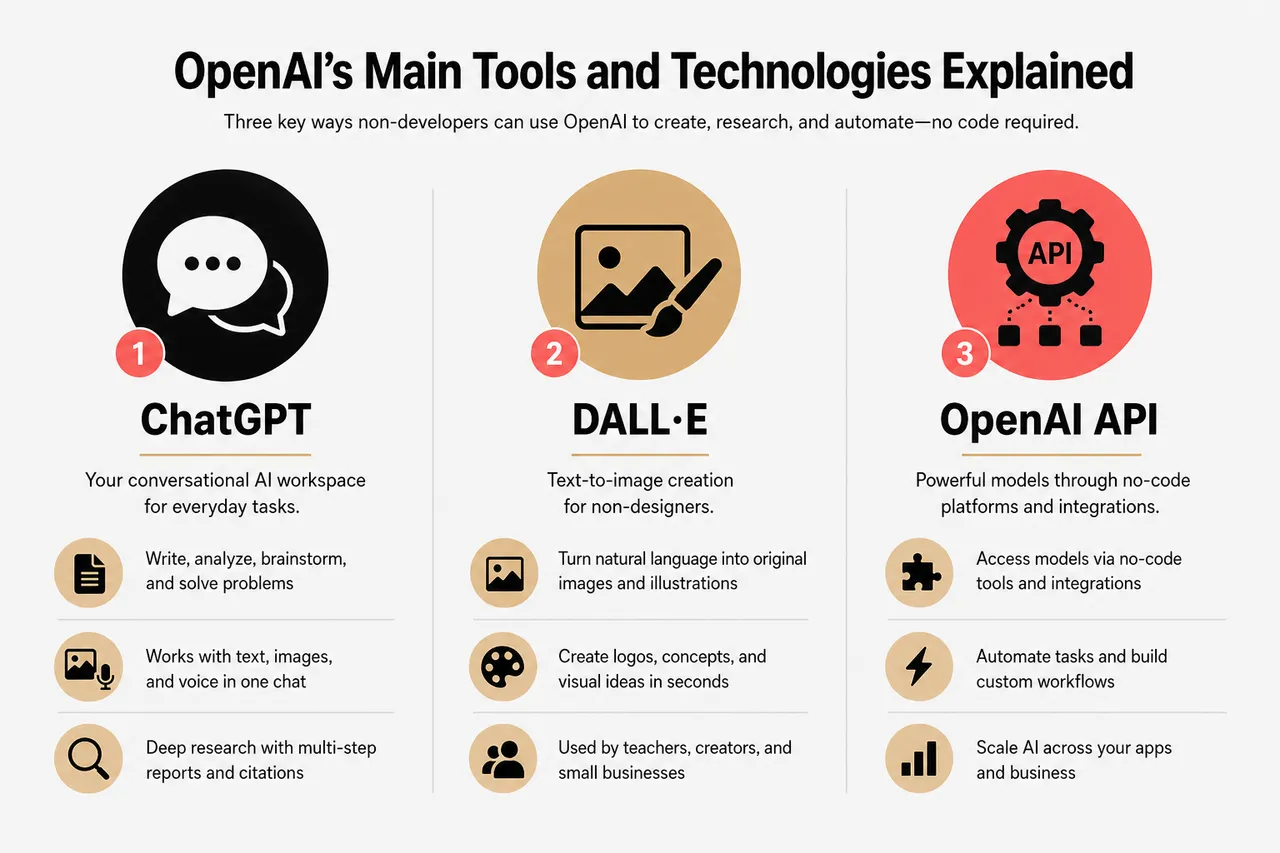
OpenAI now provides a family of tools that serve different needs but share the same core capability: letting you talk to powerful models using natural language instead of code. For non developers, the three most important entry points are ChatGPT, DALL E, and the OpenAI API as exposed through no code platforms and integrations.
- ChatGPT: your conversational AI workspace
ChatGPT functions as a general purpose assistant for writing, analysis, brainstorming, and problem solving. In recent versions, it supports multimodal input, which means it can work with text, images, and voice in the same conversation. A marketing manager might paste in a rough slide deck and ask ChatGPT to improve the narrative, while a small business owner could upload a photo of a storefront and request ideas for more appealing signage. With deep research capabilities, ChatGPT can also plan and execute multi step online investigations, then return a structured report with citations that you can review and share. - DALL E: text to image creation for non designers
DALL E translates natural language descriptions into original images, illustrations, and design concepts. Instead of spending hours in design software, you might type “minimalist blue and white logo for a neighborhood coffee shop” or “storybook style illustration of kids learning robotics in a classroom” and receive multiple options in seconds. Teachers use these images to enrich lessons, creators use them to test visual directions, and small businesses rely on them for social media content, flyers, and website banners, all without hiring a full time designer. - OpenAI API: power behind integrations and no code tools
The OpenAI API exposes the same underlying models that power ChatGPT and DALL E so that other apps and services can integrate AI features directly. While calling the API typically requires some development work, many no code tools, plugins, and platforms such as ChatGPT 247 sit on top of it and present a point and click interface. This lets you configure automated email replies, categorize support tickets, or summarize PDFs by filling out simple forms or toggling options, while the API quietly handles the complex reasoning and language generation in the background.
Recent updates to OpenAI’s ecosystem focus on making these tools more intuitive and affordable for a wide range of users. The company has introduced reasoning focused models that are optimized for tasks like long context analysis and structured reporting, and it has refined interface elements such as prompt suggestions, one click actions, and prebuilt workflows. Platforms like ChatGPT 247 build on this foundation by offering role specific templates for marketers, educators, consultants, and founders, so you spend less time figuring out what to ask and more time acting on the results.
- Fast, context aware responses with ChatGPT: Modern ChatGPT models are trained on large, diverse datasets and can incorporate recent information through web search tools. This allows them to answer detailed questions about current events, industry trends, or new technologies instead of being limited to a fixed training cutoff. When paired with ChatGPT 247’s curated prompt libraries, this means you can move from a vague research question to a well structured outline or draft in a single session.
- On demand visuals with DALL E: Low cost per image and fast turnaround make DALL E especially useful when you need to test multiple creative directions. A startup might generate dozens of ad concepts around different taglines and visual treatments, then quickly see which ones resonate with a test audience. Because images can be regenerated or refined with new prompts, it is easy to iterate visually in the same way you iterate on written content with ChatGPT.
- Automated workflows through the OpenAI API: By connecting the API to tools like CRM systems, ticketing platforms, or document management services, organizations can offload repetitive language tasks to AI. For example, customer reviews can be automatically tagged by sentiment and topic, support tickets can receive draft responses for human agents to approve, and internal policy documents can be summarized into short, role specific guides. Many of these capabilities are now accessible through connectors and no code integrations that ChatGPT 247 helps you configure without writing scripts.
Getting Started with OpenAI: A Step by Step Guide for Non Developers
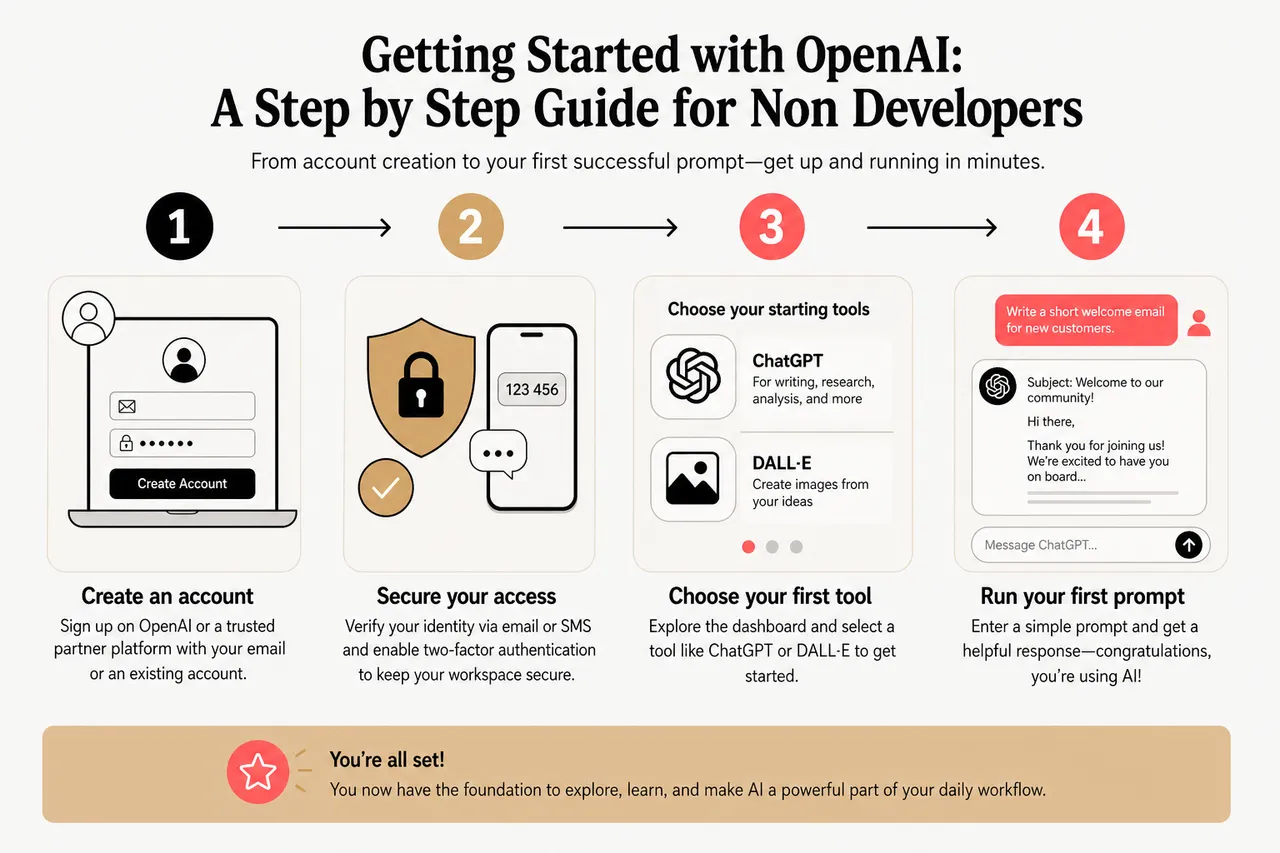
For many people, the hardest part of using AI is the first ten minutes. OpenAI and partner platforms have spent the last few years simplifying this experience so that creating an account and running your first useful prompt feels as straightforward as signing up for a new email service. ChatGPT 247 builds on this by offering structured onboarding paths tailored to different roles and industries, making the early steps smoother and more focused.
-
Create an account and secure your access
- Begin by visiting the OpenAI website or a trusted partner platform like ChatGPT 247 and following the registration flow. You will typically provide an email address, create a password, and verify your identity via email or SMS. Many users choose to sign in with existing accounts from providers such as Google or Microsoft to simplify login management.
- Once you have confirmed your account, enable two factor authentication to add an extra layer of protection. This step is especially important for businesses that may connect AI tools to internal documents, customer data, or financial records. Simple authentication apps or SMS based codes greatly reduce the risk of unauthorized access, so your AI workspace remains private and secure.
-
Explore the dashboard and choose your starting tools
- After logging in, you will see a dashboard that highlights core tools such as ChatGPT, DALL E, and any additional features included in your plan. OpenAI and ChatGPT 247 typically surface recommended getting started workflows, like “Summarize a document,” “Draft a marketing email,” or “Generate social media images,” so you can jump into a guided example without designing a workflow from scratch.
- Spend a few minutes clicking through the different sections: conversation history, settings, model or mode selection, and any connected apps. Understanding where your chats are stored and how to adjust controls such as data retention or web access will make you more confident about experimenting with sensitive topics or proprietary information.
-
Learn by doing with templates and prompt patterns
- Rather than starting with a blank chat, use templates for common tasks. ChatGPT 247, for example, offers prebuilt prompts for blog outlines, sales outreach sequences, lesson plans, and product research. By running these templates with your own details plugged in, you quickly see what an effective prompt looks like and how small changes in wording can reshape the output.
- As you grow more comfortable, experiment with basic prompt structures such as “Role + Task + Context + Constraints + Output format.” For instance, “Act as a customer support agent, respond to this complaint email in a calm, apologetic tone, keep the reply under 150 words, and include a clear next step.” Over time, you can save your best prompt patterns as reusable recipes inside ChatGPT 247 so colleagues can benefit from them too.
-
Get help and iterate safely
- If something does not work as expected, use the help center, community forums, and learning hubs provided by OpenAI and ChatGPT 247. Many common issues, such as unexpected responses or confusion around usage limits, are covered Basically guides and walkthroughs that are updated as new features roll out.
- For businesses, it can be helpful to nominate an “AI champion” who becomes familiar with available support channels and best practices. This person can collect questions from team members, schedule short internal training sessions, and coordinate with ChatGPT 247’s support if you plan to roll out AI use cases across multiple departments.
OpenAI in Action: Real World Use Cases for Individuals and Businesses
Once your account is set up and you understand basic prompting, the real value comes from weaving AI into everyday work. Across industries, organizations are using OpenAI’s tools to accelerate customer support, marketing, product development, and knowledge management, often without adding headcount or complex infrastructure. ChatGPT 247’s role is to surface the highest impact use cases for your situation and provide ready to run workflows that you can customize.
-
AI chatbot integration for customer support
- A regional ecommerce retailer might connect a ChatGPT powered chatbot to its online store to answer common questions about shipping, returns, and product availability. During peak seasons, this reduces the volume of repetitive tickets reaching human agents, allowing them to focus on complex or emotionally sensitive issues. The chatbot can also hand off conversations with a complete summary, so support staff see the full context immediately.
- Using tools built on the OpenAI API, the retailer can continuously improve the bot’s performance. ChatGPT 247 can help analyze logs to identify frequent unanswered questions and suggest new responses, while also flagging any conversations where customers expressed frustration. Over time, this creates a feedback loop that narrows gaps in the knowledge base and improves both customer satisfaction and agent efficiency.
-
Enhancing creativity with DALL E and automated content generation
- A solo marketing consultant can use DALL E to explore visual directions for multiple clients in parallel. Instead of waiting days for initial design comps, they can generate dozens of concepts for ad campaigns, email headers, and landing page hero images in an afternoon. Combined with ChatGPT drafted copy, this accelerates campaign ideation cycles and leaves more time for strategy and testing.
- ChatGPT 247 can bundle these generative tasks together: a single workflow might draft three email variations, generate five matching image prompts for DALL E, and suggest A/B testing ideas based on best practices. This kind of integrated, template driven approach helps non designers and non writers produce consistent, on brand assets even if they lack formal creative training.
-
Automated translation and multilingual FAQ solutions
- An online education platform that serves learners across several regions can rely on OpenAI models to translate course descriptions, onboarding emails, and FAQ articles into multiple languages with relatively high quality. Instead of hiring separate teams for each language, the company can have one content team generate base materials in a primary language, then use AI to localize and adapt tone for different markets.
- To ensure accuracy and cultural sensitivity, human reviewers can spot check AI generated translations and adjust prompts to guide phrasing. ChatGPT 247 can assist by providing glossaries, suggested terminology, and consistent style guides that the AI uses across all outputs. The net effect is that learners receive timely, understandable support while the organization maintains editorial control.
-
Knowledge management and internal research assistance
- Consulting firms, law practices, and research organizations increasingly use OpenAI models to synthesize large collections of documents, from case files to technical reports. Instead of manually reading hundreds of pages, analysts can ask ChatGPT to highlight key themes, identify conflicting statements, or extract quantitative data into tables. This does not replace expert judgment, but it dramatically reduces the time spent on initial review.
- With the deep research capabilities now available in ChatGPT, teams can run longer investigations that cross reference public web sources, uploaded PDFs, and connected data repositories such as cloud drives. ChatGPT 247 can help structure these projects by defining research questions, specifying which sources to trust, and designing output formats that slot directly into slide decks or client reports.
These examples show how AI driven automation and augmentation are spreading across organizations of all sizes. Freelancers and small teams often report that properly configured AI workflows feel like adding an extra part time colleague, especially for repetitive writing, summarization, and translation. Larger firms, meanwhile, use OpenAI tools to standardize processes and free specialists to focus on higher value work, rather than basic drafting or data cleaning.
The Future of OpenAI: Industry Impact, Ethics, and Trends for 2026
OpenAI is not only influencing what AI can do but also how societies think about and govern advanced models. In 2026, public awareness of AI’s economic and social impact is far higher than just a few years ago, and regulators are actively crafting rules around safety, transparency, and accountability. OpenAI is a central participant in these conversations, sharing technical findings and usage data that help policymakers understand real world risks and benefits.
The company’s commitment to ethical AI has moved beyond high level statements into concrete mechanisms. Safety research teams study failure modes like hallucinated facts, biased outputs, and potential misuse vectors in areas such as cybersecurity and synthetic media. OpenAI publishes findings on mitigation strategies and implements them in default product behavior, including content filters, better refusal strategies for unsafe requests, and clearer explanations of model limitations when questions fall outside the system’s capabilities. Partner platforms such as ChatGPT 247 inherit these safeguards and add their own usage policies to maintain trust with end users.
Looking ahead, several trends are shaping how non developers will experience OpenAI’s tools in 2026 and beyond:
- Smoother onboarding and role specific experiences: Interfaces are shifting from generic chat boxes to multi pane workspaces with context panels, suggested actions, and workflow builders. A salesperson might see quick actions like “Summarize meeting notes” or “Draft follow up email,” while a researcher might see “Outline literature review” or “Compare competing studies.” ChatGPT 247 leans heavily into these tailored experiences, using simple questionnaires to configure the environment around your role, goals, and preferred tools.
- More personalized and adaptive AI assistance: With user consent, OpenAI systems can learn from your prior interactions to better match your tone, formatting preferences, and domain specific vocabulary. Over time, this makes AI outputs feel less generic and more like they were produced by someone inside your organization. Platforms like ChatGPT 247 extend this personalization by letting you upload style guides, sample documents, and playbooks that the AI uses as reference points.
- Deeper integrations with everyday software: OpenAI models are increasingly embedded in collaboration tools, CRMs, project management platforms, and code repositories. Instead of switching to a separate AI app, you can invoke summarization, drafting, or analysis features from within documents, spreadsheets, and chat tools. ChatGPT 247 acts as a unifying layer that helps you orchestrate these capabilities across different apps, reducing context switching and keeping AI support close to where you already work.
- Continued leadership in safety, transparency, and evaluations: As models grow more capable, OpenAI is investing in systematic evaluation frameworks that test reasoning, robustness, and potential harms. Public model cards, risk assessments, and update notes help organizations make informed decisions about where and how to deploy AI. By aligning with these practices, ChatGPT 247 can give its users clear guidance on safe use, data handling, and compliance considerations, especially in regulated industries.
There is ongoing public debate about the impact of AI on employment, creativity, and decision making. Early data from businesses adopting OpenAI tools suggest that the most immediate effect is task level reshaping rather than wholesale job loss: routine drafting, basic research, and standard translations are increasingly handled by AI systems, while humans focus on relationship work, strategic choices, and nuanced judgment. For individuals and teams that learn to collaborate effectively with AI, productivity gains and job satisfaction often rise together.
Making the Numbers Work for You: Market Data and Adoption Trends
To understand why investing time in OpenAI tools is worthwhile, it helps to look at how widely generative AI is already being adopted and where organizations are seeing concrete returns. Over the last 12 to 18 months, multiple industry surveys and economic analyses have tracked rapid growth in both usage and impact, especially in knowledge intensive roles.
What Recent Data Says About Generative AI Adoption
Major consulting firms and research organizations have published studies indicating that generative AI is moving from experimentation to mainstream deployment. Many report that a significant share of workers now use AI tools at least weekly, especially in functions like marketing, customer service, operations, and software development. Enterprises cite faster content production, improved customer response times, and better decision support as primary benefits, while smaller organizations emphasize time savings and the ability to “punch above their weight” in terms of digital output.
- Workforce reach and usage frequency: Recent surveys of knowledge workers in North America and Europe indicate that a substantial minority use generative AI tools weekly or daily for core tasks such as writing, summarization, and data interpretation. Many of these users report that they discovered AI tools informally before formal company policies were established, which underscores the importance of centralized guidance platforms like ChatGPT 247 to provide guardrails and best practices.
- Productivity and time savings: Controlled experiments and in house pilots often show that workers using AI assistants can complete certain writing and analysis tasks 30 to 50 percent faster while maintaining or even improving quality. For example, customer service representatives who receive AI drafted reply suggestions can respond to more tickets per hour, and analysts can produce more scenarios or variations in the same amount of time. When aggregated across a team, these gains translate into measurable cost savings or increased capacity.
- Market size and growth rates: Industry forecasts place the global generative AI market in the tens of billions of dollars in 2026, with compound annual growth rates commonly estimated between 25 and 35 percent through the end of the decade. This growth reflects not only spending on core AI platforms like OpenAI, but also on the ecosystem of tools, implementation partners, and specialized applications that sit on top. ChatGPT 247 is part of this second layer, translating raw model capability into targeted solutions for non developers.
- User demographics and early adopters: Early and heavy adopters of generative AI tend to be younger professionals, tech savvy workers, and people in hybrid or fully remote roles who already rely heavily on digital tools. However, adoption is spreading into more traditional sectors like manufacturing, healthcare administration, and public services via easy to use interfaces and training programs. Platforms like ChatGPT 247 are especially important for these groups, as they provide structured guidance for users who may be less comfortable experimenting on their own.
- Return on investment for small and mid sized businesses: Case studies from small and mid sized organizations show that relatively modest monthly investments in AI tools can deliver outsized returns. Examples include local businesses that double the output of their marketing channels without hiring additional staff, or service firms that cut proposal turnaround times in half. By curating the most relevant OpenAI features for each type of business, ChatGPT 247 helps ensure that these investments translate into concrete, trackable outcomes rather than scattered experiments.
Key Metrics at a Glance
The table below summarizes how these trends translate into practical considerations for non developers deciding how to use OpenAI and partner platforms like ChatGPT 247.
| Aspect | What Recent Data Shows | What It Means for You |
|---|---|---|
| Adoption among knowledge workers | Generative AI tools are used regularly by a large share of professionals in content heavy and analytical roles across many industries. | Using ChatGPT and DALL E is increasingly a baseline skill, similar to spreadsheet proficiency, rather than a niche capability. |
| Productivity gains | Studies and pilots report significant time savings on drafting, summarization, and research tasks when AI assistants are used effectively. | Even a few well designed AI workflows can free hours each week for more strategic or creative work. |
| Market growth | The generative AI market is expanding at high double digit annual rates, attracting sustained investment and rapid product innovation. | New features and integrations from OpenAI and platforms like ChatGPT 247 will continue arriving, giving you more options over time. |
| User demographics | Early adopters skew toward digitally fluent workers, but usage is spreading widely as tools become simpler and better guided. | Supportive environments with training and templates can help any team, regardless of technical background, close the adoption gap. |
| Business outcomes | Organizations report improvements in content volume, response times, and customer satisfaction when integrating AI into workflows. | By tracking a handful of metrics, you can demonstrate the impact of OpenAI powered workflows and justify broader rollout. |
Designing Effective Prompts and Workflows with ChatGPT 247
Once you understand the tools and the broader trends, the next step is learning how to structure your interactions so the AI consistently delivers useful results. Prompting is not about being clever; it is about being clear, specific, and aligned with your goals. ChatGPT 247 was built to shorten this learning curve by offering examples, templates, and step by step builders that help you transform vague intentions into reliable workflows.
Turning vague requests into precise instructions
Many first time users start with prompts like “help with marketing” or “improve this document,” which usually produce generic outputs. A much better approach is to specify your role, the audience, the desired outcome, and any constraints on tone, length, or format. For instance, “Act as a marketing manager for a small fitness studio, rewrite this email to encourage inactive members to return, keep it under 180 words, and use a friendly but urgent tone.” ChatGPT 247 captures patterns like this in reusable templates so you spend less time reinventing the structure for each new task.
Building multi step workflows instead of one off prompts
Some tasks are best handled as sequences rather than single requests. A launch campaign, for example, might involve researching target customers, crafting positioning statements, drafting emails and social posts, and then designing supporting visuals. With ChatGPT 247, you can turn that sequence into a guided workflow where each step feeds into the next: the research output informs the messaging, the messaging informs the email drafts, and the email drafts suggest image prompts for DALL E. This reduces the risk of inconsistency and makes repeating the process for future products much faster.
Using feedback loops to improve quality over time
AI outputs improve when you provide specific feedback and adjustments. Instead of accepting the first response, you might say, “Shorten this by 30 percent and make the language more straightforward,” or “Give me three alternative subject lines that avoid using discounts.” ChatGPT 247 encourages this iterative mindset by keeping revision histories, surfacing follow up suggestions, and allowing you to rate outputs. Over time, the platform can learn which styles, formats, and workflows suit you best, and surface them earlier.
Aligning AI workflows with compliance and brand standards
Many organizations have legal, compliance, or brand rules that AI generated content must respect. This might include disclaimers, restricted claims, or specific wording around sensitive topics. ChatGPT 247 allows you to encode some of these requirements into prompts, templates, or shared guidelines so that every output starts closer to compliant. You can also build approval steps into workflows, ensuring that humans sign off on content before it reaches the public, while still benefiting from AI speed.
FAQs: Practical Questions Non Developers Ask About OpenAI
As AI tools become more common at work, certain questions surface repeatedly. Addressing them directly can make onboarding smoother for individuals and teams who are still on the fence about integrating OpenAI into daily workflows.
Do I need technical skills or a developer on my team to use OpenAI effectively?
No. The primary interfaces that most users interact with, such as ChatGPT and platforms like ChatGPT 247, are designed to be accessible through natural language, clicks, and simple settings. Developers are helpful if you want highly customized, large scale integrations, but non developers can obtain significant value through prebuilt workflows, connectors to common apps, and well structured prompts.
Is my data safe when I use tools like ChatGPT and DALL E?
OpenAI has implemented a variety of security controls, including encrypted connections, access controls, and policies around how user data may be used for model improvement. Many business plans allow customers to opt out of data being used for training and to retain greater control over storage and retention. ChatGPT 247 layers on additional safeguards by guiding you on what information to avoid sharing, how to configure privacy settings, and how to align usage with your organization’s data policies.
How can I measure whether OpenAI is actually improving my workflow?
The most practical approach is to pick a few key metrics and track them before and after introducing AI into a workflow. For a support team, this might be average response time and customer satisfaction scores; for marketing, content volume and engagement rates; for individual professionals, hours spent on drafting or research each week. ChatGPT 247 can help design simple measurement frameworks and dashboards so you can see whether AI driven changes are delivering the expected benefits and adjust accordingly.
What happens if the AI gives incorrect or misleading information?
Despite ongoing improvements, AI models can still produce errors, incomplete answers, or overly confident statements. For critical decisions, especially in legal, medical, or financial contexts, AI should be treated as a drafting and research assistant, not an authority. ChatGPT 247 emphasizes this by encouraging verification of important outputs, providing structured deep research flows with citations, and offering checklists for when human experts must review results before they are used.
OpenAI has made artificial intelligence accessible to everyone in 2026, whether you are looking to automate everyday tasks, generate creative content, or streamline customer support. With features like AI chatbot integration, image generation tools, automated translation, SEO optimization assistance, and FAQ automation, it is easier than ever to boost productivity and reach new audiences. The resources, tutorials, and guided workflows offered by platforms such as ChatGPT 247 mean you are not left to figure things out alone. If you are ready to see what AI can do for you, explore OpenAI’s ecosystem through ChatGPT and ChatGPT 247, and start turning your daily bottlenecks into opportunities for leverage.