You type a few words into an AI image generator, hit enter, and watch a fully realized visual materialize in seconds. What used to require hours in Photoshop or a freelance budget now happens almost instantly. For anyone exploring AI solutions, this shift feels both exciting and overwhelming. ChatGPT 247 helps individuals and businesses cut through the noise by offering clear guidance on AI tools that actually deliver results.
This guide walks you through the fundamentals: how to write effective prompts, choose the right platform, and turn rough ideas into polished visuals without prior design experience.
Introduction to Artificial Intelligence Image Generators
Artificial intelligence image generators have become essential tools for individuals and businesses in 2026. Initially developed in academic and research settings, these tools are now widely accessible, offering simple interfaces and quick results. The journey from complex prototypes to intuitive platforms has made AI-generated visuals mainstream in creative and commercial sectors.
- AI image generators transform text into visuals, using advanced machine learning models that associate words with shapes, colors, and composition to produce entirely new images from your prompts. In practice, this means that a short description like “a minimalist product shot on a soft grey background” can become a ready-to-use marketing asset in seconds, without any manual design work.
- Modern interfaces remove technical barriers, replacing complex command lines and model settings with simple web dashboards, sliders, and drag-and-drop editors so that non-technical users can generate, refine, and export images within a familiar design workflow. This accessibility has turned AI image generation into an everyday tool for marketers, teachers, founders, and freelancers.
- AI tools increasingly integrate with broader platforms, allowing generators to plug directly into content suites, collaboration tools, and assistants like ChatGPT 247 so that users can move from idea to prompt to published content in one continuous workflow. This connected experience is particularly valuable for small teams that need to stay fast and coordinated.
In 2026, the surge in digital marketing, content creation, and the need for custom visuals has driven widespread adoption. Marketers, designers, educators, and hobbyists leverage AI image generators to produce unique content on demand, bypassing traditional design bottlenecks. What once required hiring designers or learning graphic software now takes a few minutes online.
The Evolution of AI Image Generation
AI image generation has come a long way since its early days. What started as basic, sometimes awkward outputs is now a fast, creative powerhouse. In 2026, you can type a single prompt and get high-resolution images in seconds, explore countless art styles, and tweak your results with built-in editing tools. More powerful hardware and smarter training have opened the door to more realistic and diverse visuals than ever before.
Current generation models like GPT Image, Nano Banana, Flux, and modern Stable Diffusion variants illustrate how quickly quality has improved, particularly in photorealism, text rendering within images, and character consistency across multiple outputs. These systems are no longer just “image slots”; they support iterative editing where you generate a base concept, adjust specific regions, and upscale for different channels, making them feel more like full design environments than one-shot generators.
Why AI Image Generators Are Popular in 2026
Custom visuals have become the backbone of online communication. Brands use AI image generators to make their marketing stand out, designers use them to brainstorm and prototype, and everyday users bring their ideas to life without special training. With the speed and affordability these tools offer, anyone can add professional-grade images to their content strategy or personal projects with ease.
- Rising visual demand across platforms means that social feeds, product pages, and newsletters all benefit from tailored images instead of generic stock photography. AI image generators give teams the ability to maintain a consistent visual identity across dozens or hundreds of assets per month without proportionally increasing design budgets.
- Faster experimentation cycles allow marketers and creators to test multiple creative concepts in parallel, from ad variations to thumbnail designs, and then keep only the best performers. Rather than waiting days for revisions, they can iterate in hours, which is really important for campaigns that need rapid optimization.
- Lower barriers for small businesses and solo creators help those who previously could not afford dedicated design support. Armed with an AI image generator and guidance from ChatGPT 247, they can produce visuals that compete with larger brands and quickly adjust them as their strategy evolves.
How AI Image Generators Work: A Simple Explanation
Every artificial intelligence images generator is powered by a combination of machine learning and neural networks. These systems take your text input and turn it into an original image, making creative work faster, easier, and a lot more fun.
- Text-to-image models convert language into visuals by mapping your words to a learned representation of concepts like objects, styles, lighting, and composition. When you describe “a cinematic portrait with soft rim lighting,” the model links those phrases to examples it has seen during training and synthesizes a new image that matches the intent instead of copying an existing picture.
- Neural networks interpret nuanced instructions such as mood, atmosphere, or complex layouts, combining different visual elements in ways that feel coherent to humans. This allows the same generator to handle everything from realistic product photos to abstract concept art with a simple change of prompt.
- Image generation is probabilistic, not deterministic, which means the system explores many possible outputs that satisfy your request and returns one or a few candidates. Because of this, you can regenerate the same prompt multiple times and discover new variations, using the best one as a base for further refinement.
Understanding Text-to-Image Models
Think of models like those behind DeepAI and Adobe Firefly. They’ve learned from millions of image-text examples. When you type, “a cozy reading nook by a sunlit window,” the AI considers all it knows about nooks, sunlight, and style, and creates an image that matches your request. No two results are ever quite the same, so you can experiment until you find what you love.
In 2026, leading text-to-image systems increasingly focus on prompt adherence: the degree to which the final image aligns with the precise details of your description. This is especially important for business use cases, where a missed logo placement or incorrect product color can make an output unusable. As a result, modern models prioritize accurate layouts, better handling of human hands and faces, and clear, readable text inside images.
The Role of Neural Networks
Neural networks are the brains behind the magic. They mimic the way people learn by making connections between words, visuals, and concepts. Instead of pulling a stock photo, they invent something new every time you hit generate. This means that a prompt like “playful puppies in a park” can bring up different scenes and moods, letting you explore endless creative options.
Deep neural architectures also enable features like inpainting (editing specific regions of an existing image), outpainting (extending a scene beyond its original borders), and style transfer (reinterpreting an image in a different aesthetic). Together, these capabilities let you use AI as an assistant throughout the design process: first to generate ideas, then to refine details, and Lastly to adapt images for each platform where you publish.
Step-by-Step Guide: Creating Your First AI-Generated Image
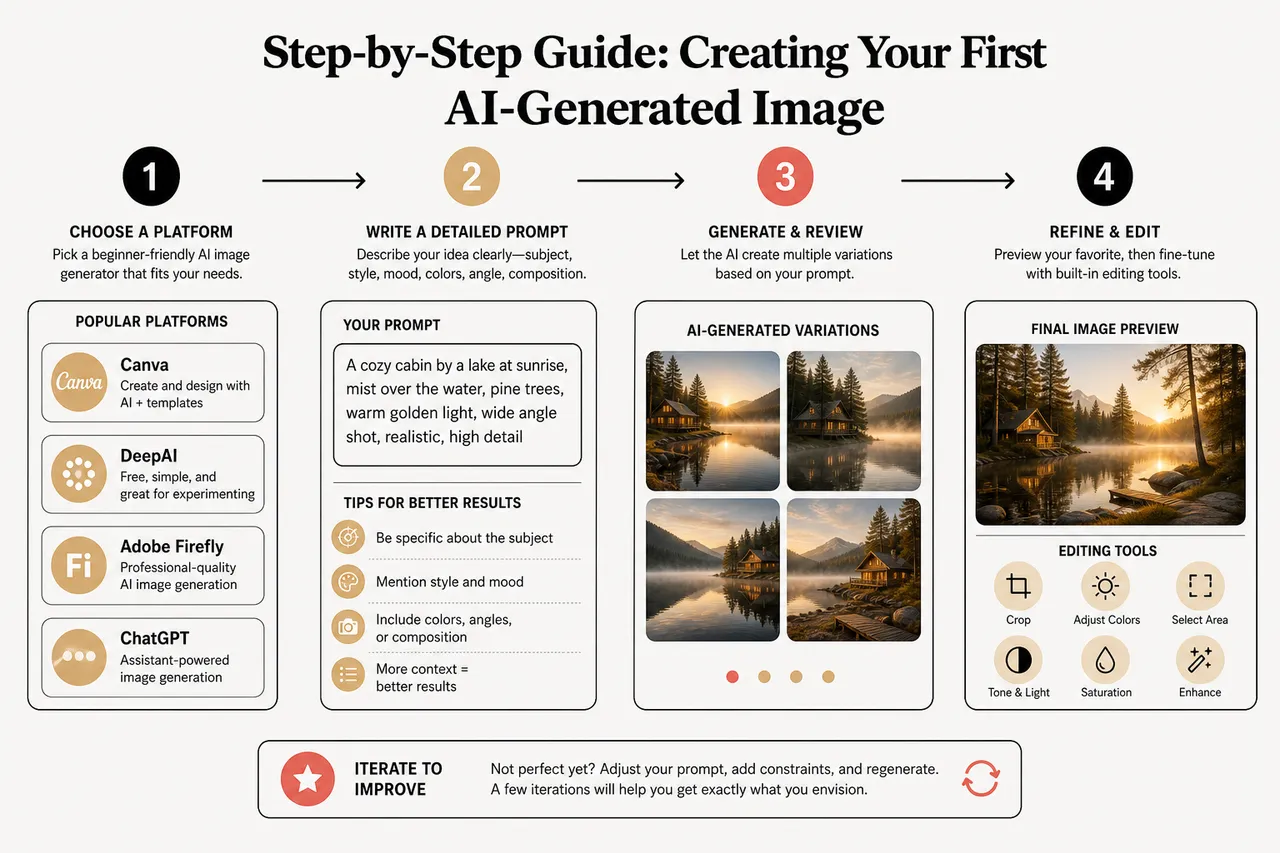
Getting started with an artificial intelligence images generator is easier than you might think. Here’s a simple path for beginners, no design background required:
- Pick a user-friendly platform like Canva or DeepAI, or connect to an assistant-powered environment via ChatGPT 247 if you prefer conversational guidance. These tools provide straightforward interfaces where you can type prompts, preview results, and apply basic edits without needing to understand the underlying models.
- Write a clear and descriptive prompt to guide the AI, focusing on the subject, style, mood, and any important details like colors, camera angles, or composition. Treat your prompt as a creative brief: the more context you give, the easier it is for the model to generate something that fits your needs the first time.
- Submit your prompt, review the generated images, and refine as needed using built-in tools for cropping, color adjustment, or regional edits. If the result is close but not perfect, adjust your wording or add constraints, then regenerate. Over a few iterations, you will quickly learn how the system responds to different types of instructions.
Selecting the Right AI Image Generator
Choosing your platform depends on what you want to create. If you’re experimenting or just getting started, DeepAI’s free, no-frills service is a great choice. Canva is perfect if you want to combine AI-generated images with templates for social media, presentations, or marketing materials. Adobe Firefly is built for advanced editing and smooth integration with creative workflows, while Leonardo.Ai stands out for flexibility, whether you’re designing business assets or personal artwork. If you’re looking to automate your FAQ section or integrate an AI chatbot alongside visuals, platforms like ChatGPT 247 make it easy to enhance customer engagement as well.
In addition to pure image generators, there is also an emerging category of assistant-led experiences where you describe your project to a chatbot, receive prompt suggestions, and then generate images in context. ChatGPT 247 fits in this space by helping you compare tools, refine prompts, and coordinate images with other AI services like translation or SEO optimization, turning fragmented tasks into a cohesive workflow.
Writing Your First Prompt
Start simple and specific. Try, “a misty forest at dawn, digital painting style,” for a landscape, or add extra detail for more control: “a group of creative professionals collaborating in a colorful, open office, modern style.” The more you guide the AI with details about scene, mood, and style, the closer you’ll get to your ideal image.
- Focus on who, what, where, and how by clearly stating the subject, setting, visual style, and emotional tone. For example, “a confident entrepreneur presenting a pitch deck in a bright startup office, clean corporate style” tells the model much more than “business person in office,” resulting in images that look closer to real-world scenarios.
- Add technical cues when relevant, such as “wide-angle,” “macro shot,” “studio lighting,” or “flat vector illustration,” to anchor the output in a recognizable visual language. These cues help the model decide how to frame the subject, which is really important for assets like thumbnails, banners, or product close-ups.
- Iterate with feedback from your audience or team, using performance data from social posts, email campaigns, or landing pages to inform your next round of prompts. Over time, you can build prompt templates that consistently produce images aligned with your brand and that resonate with your viewers.
Generating and Refining Your Image
Once you submit your prompt, the artificial intelligence images generator will show you one or more images. Use built-in editing tools to tweak colors, crop, or add finishing touches, or just revise your prompt and try again. Most systems let you regenerate as many times as you need, so don’t be afraid to experiment until you get exactly what you’re after.
- Use iterative workflows instead of one-shot prompts by generating a base concept first, then refining specific regions, adjusting backgrounds, or cleaning text within the image. This step-by-step approach results in higher quality outputs and reduces frustration compared to expecting a single perfect image on the first try.
- Leverage version history and variations, where available, to compare different generations side by side and keep those that perform best for your goals. Some platforms make it easy to fork a particularly good image into new variants, helping you explore a theme while preserving its core strengths.
- Connect human review to AI generation by involving teammates or clients in choosing final images, especially for brand-critical materials. ChatGPT 247 can help you summarize feedback, refine prompts based on comments, and document which styles or layouts tend to win approvals.
Comparison of Top AI Image Generator Tools in 2026
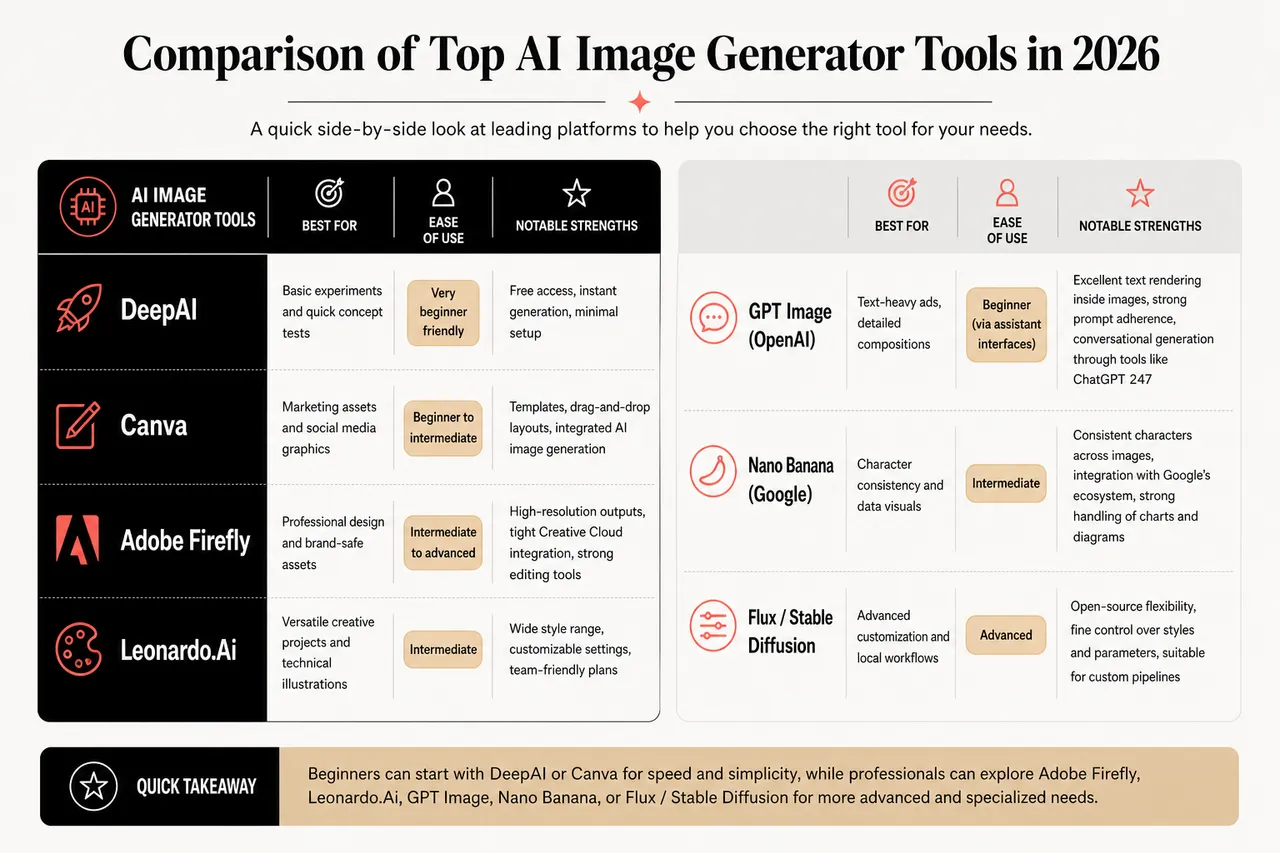
With so many artificial intelligence images generator platforms available in 2026, it helps to know what each one does best. Here’s a quick look at some of the top options that beginners and professionals can explore, often with guidance from ChatGPT 247 to match each tool to a particular use case.
| Tool | Best For | Ease of Use | Notable Strengths |
|---|---|---|---|
| DeepAI | Basic experiments and quick concept tests | Very beginner friendly | Free access, instant generation, minimal setup |
| Canva | Marketing assets and social media graphics | Beginner to intermediate | Templates, drag-and-drop layouts, integrated AI image generation |
| Adobe Firefly | Professional design and brand-safe assets | Intermediate to advanced | High-resolution outputs, tight Creative Cloud integration, strong editing tools |
| Leonardo.Ai | Versatile creative projects and technical illustrations | Intermediate | Wide style range, customizable settings, team-friendly plans |
| GPT Image (OpenAI) | Text-heavy ads, detailed compositions | Beginner (via assistant interfaces) | Excellent text rendering inside images, strong prompt adherence, conversational generation through tools like ChatGPT 247 |
| Nano Banana (Google) | Character consistency and data visuals | Intermediate | Consistent characters across images, integration with Google’s ecosystem, strong handling of charts and diagrams |
| Flux / Stable Diffusion | Advanced customization and local workflows | Advanced | Open-source flexibility, fine control over styles and parameters, suitable for custom pipelines |
- DeepAI is super easy for beginners, offering a minimal interface where you simply enter a prompt and download the result. It is ideal for first-time users who want to understand how AI image generation feels without committing to subscriptions or complex accounts.
- Canva combines AI image generation with a rich library of templates, fonts, and layout tools, making it a strong choice for small businesses and social media managers. Because you can design entire campaigns in one place, it fits naturally into everyday content workflows.
- Adobe Firefly delivers high-resolution images and advanced editing features, seamlessly fitting into Adobe Creative Cloud. This makes it especially attractive to professional designers and agencies that already rely on tools like Photoshop, Illustrator, or Premiere and need predictable, brand-safe outputs.
- Leonardo.Ai offers robust options for creative projects, technical diagrams, and stylized illustrations. Its flexible pricing and team-oriented features make it a promising solution for startups that want to integrate AI into design processes without rebuilding their stack from scratch.
Creative and Business Applications of AI-Generated Images
AI-generated visuals are now everywhere, from bold marketing campaigns to personal art projects. Their speed and flexibility have transformed how we create and communicate across industries, and they increasingly work in tandem with platforms like ChatGPT 247 to coordinate text, visuals, and automation.
- Businesses use AI visuals for content pipelines, including blog illustrations, social media posts, product mockups, and pitch decks. By generating tailored images on demand, they reduce reliance on generic stock photos, cut freelance design costs, and maintain a more coherent brand identity, especially when supported by prompt libraries and brand style guides.
- Individual creators and hobbyists prototype ideas quickly, turning concepts into visual experiments for portfolios, online shops, or personal websites. This is particularly empowering for photographers, illustrators, and influencers who can test new aesthetics or series before committing to full productions.
- Educators and trainers create custom visual materials such as diagrams, scenario illustrations, or interactive slides that better reflect their learners’ contexts. AI image generators make it easy to adapt teaching materials for different audiences without rebuilding every image from scratch.
Marketing and Content Creation
Think about launching a new product: with an artificial intelligence images generator, you can instantly create several ad variations, test them across different channels, and optimize based on feedback, all in a day. This means faster go-to-market times and more creative freedom for brands of any size.
When combined with analytics and automation, AI-generated images can become part of a measurable content strategy. For instance, teams can track click-through rates on ads with different visuals, then refine their prompts around the styles that perform best. ChatGPT 247 can help interpret that data, suggest new angles, and streamline the handoff between text and image creation.
Design and Personal Projects
Designers now use AI tools to spark ideas, build mood boards, and turn rough sketches into highly polished visuals. For personal projects, AI lets you turn a simple prompt into a birthday card, a unique illustration, or even a custom event invitation in minutes. With features like AI chatbot integration, you can even automate design feedback or offer interactive customer support while you build your creative assets.
Many creators also pair AI images with traditional techniques, using generated visuals as references for painting, 3D modeling, or photography setups. This hybrid approach keeps human creativity at the center while letting AI handle repetitive tasks, layout variations, or early-stage exploration.
Tips for Writing Effective Prompts for AI Image Generation
Getting the best results from your artificial intelligence images generator comes down to one thing: the quality of your prompt. The clearer and more detailed your request, the better your images will turn out, and ChatGPT 247 can act as a prompt coach whenever you need help refining your ideas.
- Be specific about what you want, thinking carefully about style, subject, and mood. Instead of “office scene,” try “a bright, collaborative startup office with glass walls, people brainstorming at whiteboards, modern minimal style,” which gives the model a richer set of visual cues to work with.
- Include extra touches like lighting and color palette, such as “soft sunset lighting,” “high-contrast neon,” or “muted pastel tones,” to steer the emotional feel of the image. These details can make the difference between a generic visual and one that matches your brand or story.
- Experiment with different wording and structures, comparing short conceptual prompts (“futuristic city, optimistic mood”) with more detailed narrative descriptions (“a futuristic city skyline at golden hour, drones in the sky, calm and hopeful atmosphere”). Over time, you will discover which format works best for each generator.
Prompt Templates for Different Scenarios
-
Business:
- Brand scenes: “A professional team collaborating in a modern office, bright colors, clean and optimistic corporate style.” This type of prompt works well for website hero images or presentation covers, signaling energy and teamwork.
- Product visuals: “A sleek product mockup on a white background, minimalist style, soft shadows, studio lighting.” Use this structure to generate simple, high-impact product shots for catalogs, landing pages, and ads.
- Data storytelling: “A clean infographic visualizing rising customer satisfaction, flat vector style, blue and green palette.” While some models now render text more reliably, you can still generate layouts and then add final labels manually or in a design tool.
-
Creative:
- Concept art: “A surreal landscape with floating islands and glowing trees, watercolor style, soft and dreamlike atmosphere.” This helps illustrators or writers See worlds for stories, games, or films.
- Character-focused images: “A whimsical cat reading a book under a starry sky, cartoon style, warm and cozy lighting.” Such prompts are ideal for posters, children’s content, or social posts that rely on strong, memorable characters.
- Cinematic frames: “A dramatic close-up of a hero standing in the rain, cinematic lighting, high contrast, film still style.” These are particularly useful for filmmakers, storyboard artists, or content creators who need quick visual beats for narratives.
Common Prompt Mistakes to Avoid
- Overly vague prompts lead to generic images. Requests like “a dog” or “a city” provide minimal guidance, so the AI defaults to average representations that may not fit your needs. Instead, specify breed, setting, mood, and style, such as “a golden retriever puppy playing in a garden, photorealistic style, soft morning light,” to achieve targeted outputs.
- Conflicting instructions confuse the model. Stuffing a prompt with incompatible styles or contradictory emotions, such as “dark horror mood, bright cheerful colors, realistic cartoon,” can produce muddled results. It is usually better to focus on one coherent concept per image, then generate separate versions for different moods.
- Ignoring model limitations around complex text or tiny details can result in frustration. If you need perfectly spelled headlines or intricate UI elements inside an image, consider treating the AI-generated visual as a base and adding delicate text or fine-grained components later in a design tool.
Responsible, Safe, and Strategic Use of AI Image Generators
As AI images become more central to business and everyday communication, it is increasingly important to think about licensing, ethics, and long-term workflow strategy, not just visual quality. ChatGPT 247 can guide you through these considerations so you get great results without unnecessary risk.
Licensing, Commercial Rights, and Safety Signals
Different platforms follow different rules for how images can be used, especially in commercial contexts. Before adopting an artificial intelligence images generator for marketing campaigns or product visuals, it is wise to check whether the service clearly grants rights for commercial use, offers content filters for sensitive topics, and provides documentation that your team can reference. This helps prevent misunderstandings about where images can be published and reduces the chance of having to redo assets later.
Ethical and Regulatory Considerations
AI image generation also raises questions around privacy, representation, and regulatory compliance, particularly when images depict people or real-world environments. While most generators avoid recreating specific individuals by default, it is still good practice to steer prompts away from identifiable private data or misleading depictions. In regulated industries, teams may need to align image usage with internal policies or regional guidelines, and ChatGPT 247 can help summarize these needs into safe prompt frameworks.
Building Sustainable, Data-Informed Workflows
To get consistent value from AI image generators, many organizations now treat them as part of a broader content workflow rather than standalone novelty tools. They create prompt libraries, define preferred styles, track performance of AI-generated visuals in campaigns, and gradually refine their prompts and tool choices based on real-world outcomes. With support from ChatGPT 247, you can turn scattered experiments into a repeatable system that saves time, preserves brand integrity, and keeps your visuals aligned with evolving business goals.
Beyond the Basics: Getting the Most from Your AI Image Generator
With the right mix of clear prompts and the right artificial intelligence images generator, anyone can create standout visuals, no design background required. As these tools keep evolving, you’ll find even more ways to streamline your workflow, improve customer engagement, and boost your brand’s reach. Automated translation services can help localize your images for a global audience, while built-in SEO optimization features make sure your visuals stand out online. Plus, FAQ automation can reduce manual workload by handling common queries, letting you focus on what matters most: creativity and impact.
Keep experimenting with different prompts, styles, and platforms. The more you play with these tools, the more you’ll discover about your creative process and what resonates with your audience. If you’re ready to level up your visual content, start exploring the possibilities today with your favorite artificial intelligence images generator. And whenever you need tips, inspiration, or expert support, ChatGPT 247 is there to help you stay ahead in the ever-changing world of AI-powered creativity.
| Aspect | Key Question | Practical Takeaway |
|---|---|---|
| Tool choice | Which generator fits my use case? | Match tools to goals: quick tests with DeepAI, marketing with Canva, professional workflows with Adobe Firefly, and assistant-led strategies with ChatGPT 247 plus advanced models. |
| Prompt quality | How detailed should my prompts be? | Include subject, style, mood, and technical cues, then iterate based on outputs and audience feedback. |
| Workflow design | How do I integrate AI into my content process? | Use iterative generation, maintain prompt libraries, and track which visuals perform best in real campaigns. |
| Safety and licensing | Can I use these images commercially? | Check platform licensing terms, use content filters, and document acceptable use for your team before large-scale deployment. |
Frequently Asked Questions About AI Image Generators
Can I use AI-generated images for commercial projects?
In many cases, yes, but it depends on the specific platform and its licensing terms. Some tools explicitly grant commercial rights for generated images, while others restrict certain uses or require paid plans for business deployment. Always review the provider’s documentation and, when in doubt, consult your legal or compliance contacts. ChatGPT 247 can help you summarize these rules and incorporate them into your workflow.
Do AI image generators replace human designers?
AI image generators do not replace human designers; they change how designers work. Instead of spending most of their time on repetitive tasks or early drafts, creatives can delegate exploration and simple variations to AI and focus on higher-level concept development, brand strategy, and final polish. Many of the strongest results in 2026 come from collaboration between humans and AI, not from either working alone.
What is the “best” AI image generator in 2026?
There is no single best generator for every scenario. Some models excel at photorealism and high resolution, others specialize in character consistency, cinematic lighting, or text inside images. For beginners, tools like Canva, DeepAI, Adobe Firefly, and Leonardo.Ai provide strong starting points. For more advanced work, pairing assistant platforms such as ChatGPT 247 with high-performing models lets you choose the right tool for each job while keeping your process organized and efficient.