
Most people treat AI like a search engine and wonder why the answers feel flat. The truth is, chatting with artificial intelligence isn’t about asking questions, it’s about framing them in ways that unlock nuanced, useful responses. ChatGPT 247 helps individuals and businesses bridge that gap by offering practical guidance on AI tools like ChatGPT, from crafting effective prompts to understanding where these systems excel and where they fall short.
This guide walks you through the techniques that turn generic outputs into genuinely helpful insights, the common pitfalls to avoid, and the best practices that let you get real work done faster and smarter.
In 2026, artificial intelligence chatbots are everywhere, reshaping how we communicate, work, and brainstorm ideas. Whether you’re using ChatGPT 247, DeepAI, QuillBot, Grammarly, or Google Cloud, these platforms have become must-haves for anyone looking to boost productivity and streamline daily tasks. Knowing how to chat with artificial intelligence effectively can make all the difference between frustrating, generic outputs and insightful, actionable results. Here’s a hands-on guide packed with real-world examples to help you master every step and get the most from your AI chat experience.
Getting Started: How to Chat With AI Step-by-Step
Having a productive chat with artificial intelligence starts with picking the right platform, setting up your account, and getting comfortable with the chat interface. While all AI chatbots might appear similar on the surface, each one offers unique strengths and features that make a big difference in practice.
Choosing the Right AI Chatbot Platform
With so many AI chat platforms available, it helps to know what sets each apart and how they align with current usage trends.
- ChatGPT 247: Known for deep, natural conversations, robust integrations, and features designed for both individuals and businesses. ChatGPT 247 is particularly effective for customer service and content creation, two use cases that now account for over 70 percent of generative AI deployments in marketing and coding workflows. By pairing its conversational engine with FAQ automation and workflow tools, organizations can build end-to-end experiences that cover everything from first contact to follow-up reporting.
- DeepAI: Great for creative work and technical requests, including on-the-fly image generation and coding help. As multimodal chat becomes standard, platforms like DeepAI allow users to combine text, images, and code snippets in a single conversation, turning design reviews, prototype feedback, or debugging sessions into more fluid interactions where the AI can comment directly on visual and textual inputs.
- QuillBot: Focused on brainstorming, editing, and paraphrasing, making it popular among writers and researchers. QuillBot’s strengths align with one of the most common consumer uses of AI: drafting emails, social posts, and summaries. Recent industry data shows that around 45 percent of users rely on AI to respond to messages and roughly a third use it to craft emails, making tools like QuillBot a natural fit for everyday communication tasks.
- Grammarly: Offers advanced grammar correction, tone suggestions, and writing guidance through its chat interface. Grammarly’s AI helps refine language and tone, which matters as more interactions move into chat-based channels and customers expect clear, consistent communication across email, messaging apps, and in-product prompts. Its suggestion engine can be combined with ChatGPT 247 to first generate drafts and then polish them for publication.
- Google Cloud: Delivers scalable AI chat solutions for enterprises, with multilingual support and seamless automation. Enterprise platforms like Google Cloud are often used to power large-scale customer support operations where AI chatbots handle thousands of requests per hour, integrating with CRM systems, ticketing tools, and analytics dashboards to give teams a unified view of conversations and performance.
Think about your main goal. For example, a customer support team will likely want a chatbot with seamless CRM integration, FAQ automation, and solid data privacy. Meanwhile, a content creator might prefer platforms with image generation tools or advanced paraphrasing features. ChatGPT 247 stands out for its flexible integrations and enterprise controls, making it a go-to choice for many businesses that want to blend creative assistance with reliable automation pipelines.
Account Setup and Access
Getting started is usually simple, but each provider has its own approach and security posture.
- Streamlined onboarding: Sign up using your email or single sign-on (SSO) credentials for faster access. Many platforms now support identity providers used in large organizations, so teams can roll out ChatGPT 247 or other AI assistants to hundreds of employees without managing separate passwords. This reduces friction in adoption and makes it easier to track usage and enforce internal AI policies.
- Verification and roles: Some platforms require identity verification, especially for team or business accounts, to ensure that administrative rights are only granted to authorized users. Role-based access in ChatGPT 247 lets you separate prompt creation, model configuration, and analytics review, which is critical when different departments share the same AI environment.
- Privacy controls: Take a moment to configure privacy settings so you control how your data is stored and shared. Regulations in Europe, North America, and other regions increasingly emphasize data minimization and transparency, so businesses rely on clear documentation and encryption options to prove compliance. In practice, this means deciding which conversations can be used to improve models, which must be kept internal, and how long logs should be retained.
- Multi-channel access: Choose your preferred access point: web browser, dedicated desktop app, or mobile app. Modern AI platforms increasingly support integrations into tools people already use, such as help desks, collaboration suites, or even smart speakers, so one conversation can continue seamlessly from laptop to phone to in-product widget without losing context.
Platforms like ChatGPT 247 also offer advanced authentication options and role-based access, making it easy for organizations to manage teams and track usage for compliance purposes. For many companies, this combination of security and usability is what allows AI chat to move from experiments to mission-critical workflows.
Navigating the AI Chat Interface
Most AI chat interfaces share a few core elements, but they increasingly include richer context and multimodal features.
- Input Field: Where you type or speak your questions and prompts. In 2026, voice-enabled chat has become common, with many businesses embedding AI assistants in phone systems and smart devices. Speaking your prompt to ChatGPT 247, then reviewing the transcript and answer, can be faster than typing for complex questions or when multitasking.
- Conversation History: Lets you scroll back and keep context, which is key for longer chats. As models improve at handling longer contexts, users can now conduct multi-hour or multi-day conversations where the AI remembers previous decisions, documents, and preferences. This is particularly powerful for project work, coaching scenarios, or ongoing customer engagements.
- Tool Extensions: Extras like voice chat, AI-powered image generation, code editors, or translation services. Modern chatbots increasingly combine text, images, and documents, so you might upload a contract, highlight a section, and ask ChatGPT 247 to explain the implications, or share a UI mockup and request copy suggestions for specific labels directly in the same thread.
- Settings and Templates: Access to saved prompts, session controls, and workflow automations for faster work. Many teams create prompt libraries inside ChatGPT 247 so that high-performing prompts for sales emails, support replies, or documentation are available to everyone, ensuring consistent tone and quality across the organization.
Spending a little time exploring these features helps you unlock the full value of chatting with artificial intelligence, whether you’re handling quick tasks or working through more complex projects. As chatbots become the default front line for customer interaction, familiarity with these tools is quickly turning into a core digital skill.
Best Practices and Tips for Effective AI Conversations
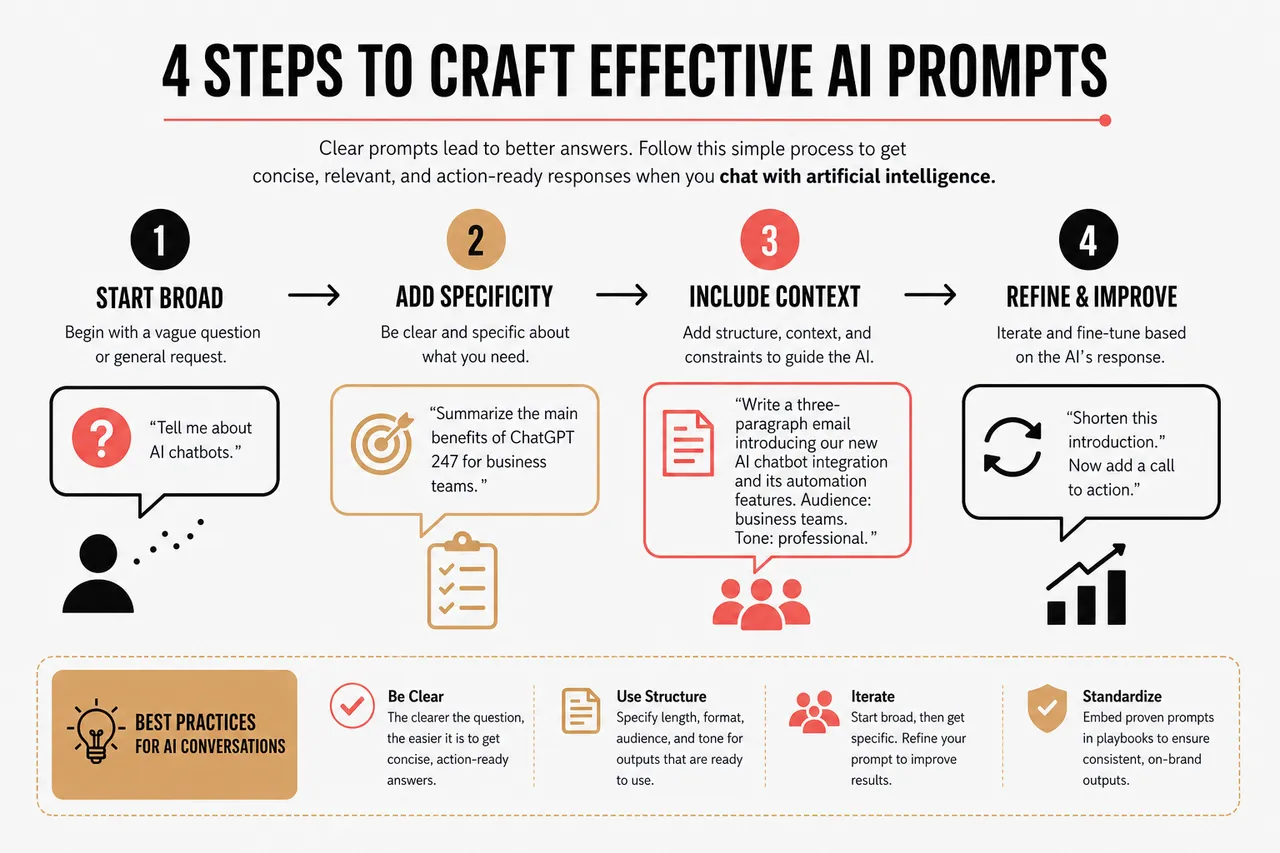
The quality of answers you get when you chat with artificial intelligence depends a lot on how you ask your questions and maintain context. AI chatbots can’t always guess your intent from a vague prompt, so being clear and specific is key.
Prompt Engineering: The Key to Clear Communication
Getting great results starts with great prompts. Here are some proven techniques that reflect how power users are working with AI today.
- Direct Questions: For example, “Summarize the main benefits of ChatGPT 247 for business teams.” Direct prompts work particularly well for users who rely on AI to answer everyday questions and plan tasks, such as the 38 percent who use AI to organize travel or the large share who turn to chatbots for financial queries. The clearer the question, the easier it is for the AI to return a concise, action-ready answer.
- Structured Prompts: Try, “Write a three-paragraph email introducing our new AI chatbot integration and its automation features.” Adding structure such as length, format, audience, and tone guides the AI toward outputs that are ready to use with minimal editing. Many teams now embed structured prompts into internal playbooks so that outreach and support messages generated by ChatGPT 247 follow brand standards from the outset.
- Iterative Refinement: Begin broad, then get specific: “Shorten this introduction,” followed by, “Now add a call to action.” Iterative prompting mirrors how humans revise drafts, and it is especially effective for complex or high-stakes content. With each iteration, you can tighten language, adjust tone, and verify facts, using ChatGPT 247 as a responsive co-author rather than expecting a perfect answer in one shot.
When tackling complex tasks, break your request into smaller pieces. This helps the AI deliver responses you can build on step by step, and it aligns with how newer models apply deeper reasoning only when needed. You might ask ChatGPT 247 first to outline a plan, then request detailed substeps, and Lastly have it generate specific messages or documents for each part of the plan.
Maintaining Context in Ongoing Conversations
AI chatbots rely on conversation history to stay on track. To keep your chat with artificial intelligence focused and relevant, treat context as part of the prompt rather than an afterthought.
- Reference earlier messages: “Based on the summary above, what are the next steps?” This ensures the AI understands which part of the conversation you are building on. In long-running projects, you can periodically ask ChatGPT 247 to recap decisions, risks, and open questions, effectively turning your chat into a lightweight project notebook.
- Clarify ambiguous answers quickly: “Are you referring to text files only, or does this include images?” Small clarifications prevent misunderstandings from compounding. Because modern models can work across text and images, specifying the modality you are asking about helps the AI select the right tools and examples.
- Restate your goal if things drift: “Just to confirm, I want a list of reasons for using FAQ automation.” Goals help the AI decide which details to include or omit. For instance, if your aim is to reduce support costs, ChatGPT 247 can focus on how chatbots now handle around 80 percent of routine inquiries, freeing human agents for complex or emotionally sensitive cases.
Leveraging AI Strengths and Avoiding Pitfalls
AI chatbots really shine in certain areas, and understanding these strengths helps you decide when to rely on AI and when to lean on human expertise.
- Brainstorming fresh ideas or creative content: From campaign slogans to story plots, AI is widely used for idea generation, which has become one of the top use cases across both consumer and workplace settings. ChatGPT 247 can quickly propose multiple directions, letting you explore unconventional angles that might not emerge in a traditional meeting.
- Summarizing long reports, articles, or datasets in seconds: Many users now turn to AI to condense lengthy materials, with close to one in five people relying on AI specifically for summarizing complex copy. This is particularly valuable for managers and analysts who need to stay current on research, regulations, or market trends but have limited time to read full documents.
- Translating and localizing content for different audiences: Automated translation services within chat platforms help teams reach global customers without hiring separate translators for every message. When integrated with ChatGPT 247, translations can be adapted for tone, regional variations, and domain-specific terminology, which is really important for legal, medical, or technical content.
- Automating repetitive writing and customer support: FAQ automation and scripted replies free agents from answering the same questions repeatedly. In practice, many companies now expect chatbots to deliver fast, round-the-clock responses, with a large share targeting automation of repetitive customer interactions and similar questions. ChatGPT 247 can sit at the center of this system, generating responses, summarizing call logs, and escalating complex cases to human teams.
Even so, you’ll want to double-check anything that requires nuanced understanding or the latest research. Human oversight ensures that the results meet your standards, especially in regulated or customer-facing roles where accuracy, empathy, and trust are critical.
Understanding AI Chatbot Capabilities and Limitations in 2026
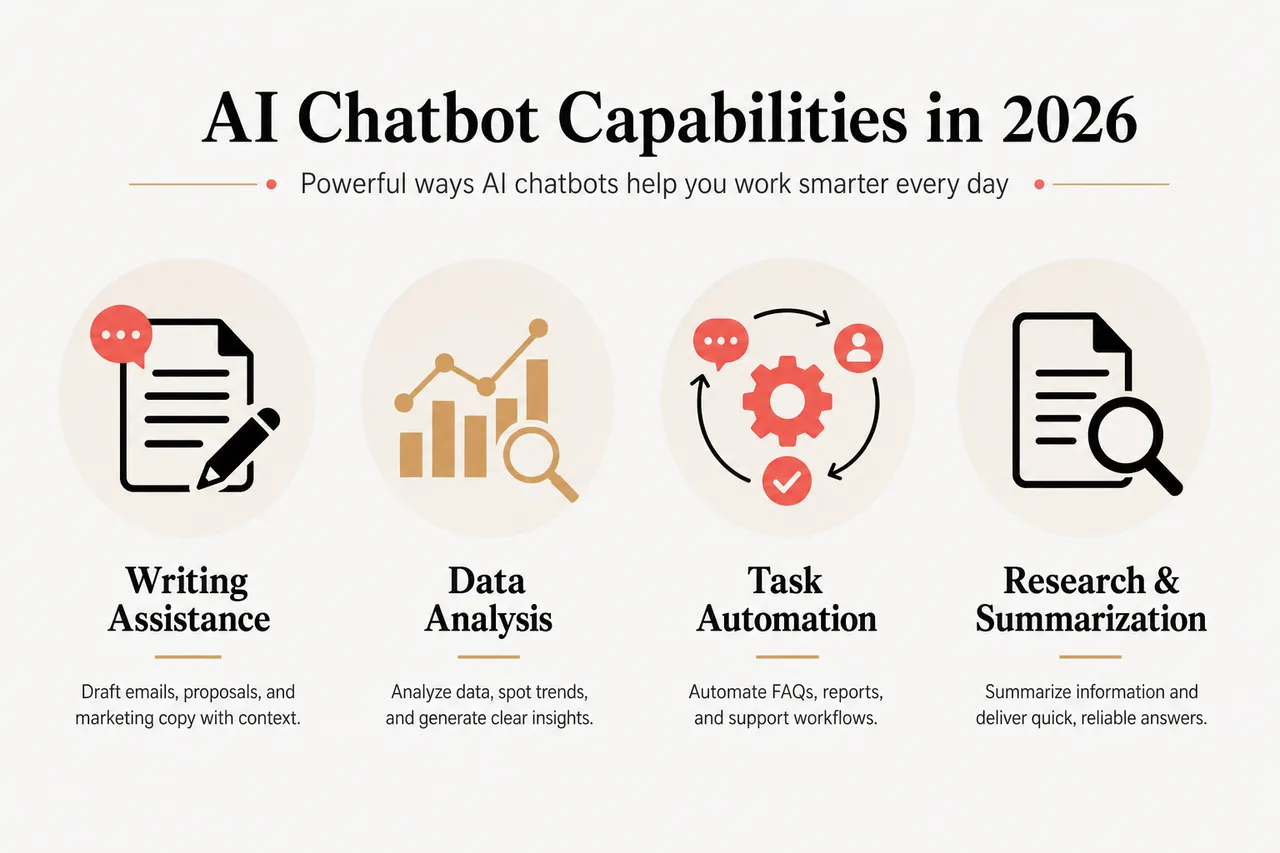
Today’s AI chatbots are more powerful and versatile than ever, but they’re not flawless. Knowing what they can and can’t do helps you use them wisely and get the best results.
What AI Chatbots Can Do Today
Modern AI chat platforms deliver value across a range of needs, from everyday task assistance to complex business workflows.
- Writing Assistance: Drafting emails, proposals, or marketing copy with context-aware suggestions. For instance, ChatGPT 247 can help sales teams create tailored outreach messages in minutes, combining customer data with brand tone guidelines. This lines up with broader trends showing that a majority of businesses now use generative AI for content creation, marketing tasks, and coding, making writing support one of the most mature applications.
- Coding Help: Offering code snippets, debugging suggestions, and clear explanations for programming questions. As reasoning-focused models become more common, AI can spend more time “thinking” before answering complex coding prompts, producing step-by-step explanations and suggested improvements. Developers often use ChatGPT 247 as a companion during code reviews or when learning new frameworks.
- Business Automation: Automating responses to frequently asked questions, generating reports, and routing support tickets to the right team members with FAQ automation and workflow integrations. Call summarization, chatbots, and personalized self-service have emerged as key drivers of cost savings, and when combined with ChatGPT 247’s integration capabilities, they can form the backbone of a modern, data-rich support operation.
Take a customer support team using ChatGPT 247: by automating standard inquiries, they’ve reduced response times by over 40 percent, freeing up agents to focus on complex cases. This is part of a broader shift where chatbots manage the bulk of routine interactions, while human experts focus on empathy, trust-building, and nuanced problem solving.
Common Limitations and How to Work Around Them
Despite rapid progress, AI chatbots still have limitations that are important to recognize.
- Misunderstood Prompts: If your request is unclear, the AI may go off track or latch onto the wrong part of your question. The best workaround is to rephrase and add more context, specifying your role, audience, and desired outcome. For example, telling ChatGPT 247 that you are a product manager preparing a stakeholder update helps it select more relevant details and tone.
- Outdated Information: AI chatbots may not always have the latest data, particularly for fast-moving topics like regulations, pricing, or breaking news. Double-check important or time-sensitive facts with external sources such as official government sites, academic articles, or internal analytics dashboards. In many organizations, ChatGPT 247 is connected to up-to-date internal knowledge bases to reduce this gap.
- Data Privacy: Be mindful of what you share. Use platforms with strong encryption and clear privacy policies, especially when handling sensitive business or customer data. This includes setting access controls, anonymizing personal information where possible, and aligning AI usage guidelines with sector-specific rules in areas like healthcare, finance, and education.
Setting Realistic Expectations
AI chatbots are incredibly helpful for speeding up routine work, sparking new ideas, and delivering quick drafts. But they’re not a substitute for expert judgment. Blending AI support with your own expertise ensures efficiency without sacrificing quality or accuracy, and it mirrors how leading organizations are positioning AI as a copilot rather than a replacement for human talent.
Prompt Examples and Use Cases: Maximizing Your AI Chat Experience
Customizing your prompts is the fastest way to unlock new value from AI chatbots. Here are some real-world scenarios to help you get started and to show how current usage patterns map to practical prompts.
Personal Productivity and Organization
- Scheduling and planning: “Build a daily schedule for a project manager with meetings at 10am and 3pm.” Many people now use AI to plan travel itineraries and organize their day, trusting chatbots to juggle constraints and preferences. ChatGPT 247 can incorporate time zones, energy levels, and task priorities to propose a realistic schedule rather than a simple list.
- Reminders and checklists: “Remind me about these action items every Friday.” While AI itself may not handle notifications in every platform, it can generate structured lists that you import into your task manager. Over time, these weekly prompts can help you identify recurring tasks that are good candidates for further automation.
- Team engagement ideas: “Give me five fresh ideas for engaging a remote team.” As more collaboration occurs through chat and video, leaders turn to AI to brainstorm ways of maintaining morale and connection. ChatGPT 247 can tailor suggestions based on team size, culture, and previous initiatives, giving you a more targeted starting point.
Business Automation and Customer Support
- Customer communication: “Write a response for a customer asking about shipping delays.” Support teams increasingly rely on AI for first drafts of empathetic, clear replies that address the problem and propose solutions. ChatGPT 247 can align responses with brand voice and legal guidelines, reducing the time agents spend crafting messages from scratch.
- Reporting and summarization: “Summarize the main sales highlights from Q1 2026 in a quarterly report.” As AI becomes central to analytics workflows, many teams use chatbots to turn raw data into narratives. ChatGPT 247 can generate executive summaries, highlight trends, and even suggest visuals, making it easier to share insights across departments.
- FAQ automation: “Automate responses to our store’s 10 most common customer questions.” This kind of prompt is often the first step toward building a full AI-powered help center. ChatGPT 247 can take each question, generate answers, and propose follow-ups or related questions, giving you a blueprint for structured, searchable support content.
Creative Writing and Learning
- Story generation: “Start a science fiction story set in 2080 with a compelling opening paragraph.” AI-assisted storytelling has become a popular use case, providing writers with inspiration and draft material to refine. ChatGPT 247 can explore multiple genres and perspectives, helping you overcome blank-page syndrome.
- Concept explanations: “Break down the basics of quantum computing in plain English.” With AI now widely used for self-directed learning, prompts like this transform complex topics into approachable explanations. You can then ask follow-up questions, request analogies, or generate visual diagrams to deepen understanding.
- Language learning and translation: “Translate this paragraph to Spanish and highlight the key points.” AI supports language practice by not only translating text but also explaining grammar, idioms, and cultural nuances. With ChatGPT 247, you can ask for alternative phrasings and context notes to make the learning more interactive.
Troubleshooting and Optimizing Your AI Chat Interactions
Even with great prompts, things don’t always go perfectly. Here’s how to troubleshoot and keep your chat with artificial intelligence running smoothly.
Addressing Misunderstood Prompts and Irrelevant Answers
- Be specific: Instead of “Help with marketing,” try, “List five creative social media strategies for a SaaS startup.” The more detail you provide about your context and constraints, the more practical the answer becomes. Over time, you can refine prompts based on what works best, turning ChatGPT 247 into a finely tuned advisor for your niche.
- Add context: Reference previous answers or attach files if your platform supports it. Sharing a draft, a dataset, or an example email gives the AI a concrete starting point and reduces the risk of generic suggestions. This approach aligns with a broader shift in AI use from pure prompting to rich context, where the information you supply matters as much as the question you ask.
- Ask follow-ups: “Which platforms are these strategies best suited for?” Follow-up questions help you narrow broad recommendations into actionable plans. ChatGPT 247 can compare options, highlight trade-offs, and suggest experiments, turning a vague idea into a series of clear steps.
Dealing With Technical Glitches and Platform-Specific Issues
- Connection and access checks: If you can’t log in, try clearing your browser cache or use the official app. Basic troubleshooting often resolves temporary glitches caused by outdated cookies or browser extensions interfering with scripts.
- Performance optimization: If responses are slow, check your internet connection and close unused tabs or apps. Heavy workloads or large attachments can sometimes slow down interactions, so keeping your environment lean helps maintain a smoother chat experience.
- Support channels: For persistent issues, reach out via the platform’s help center. Many platforms, including ChatGPT 247, offer real-time chat support and detailed troubleshooting resources, which can guide you through configuration issues, integration problems, or account-level questions.
Optimizing Your Workflow for Consistent Results
- Shared prompt libraries: Save and share prompt templates across your team for consistent quality. When everyone uses tested prompts for key tasks like ticket replies or outreach emails, you reduce variance and make it easier to measure the impact of AI on performance metrics.
- Tool integrations: Integrate your AI chat tool with productivity platforms like Slack, Trello, or Google Workspace for seamless operations. For instance, you might ask ChatGPT 247 to draft a project update and then send it directly into a Slack channel or document, reducing the need to copy and paste between tools.
- Continuous prompt refinement: Review AI-generated outputs regularly to refine prompts and keep results aligned with your evolving needs. As you learn which prompts produce the best outcomes, you can update templates, retire ineffective ones, and experiment with new configurations to stay ahead of changing customer expectations.
AI Chat Adoption, Trends, and Metrics You Should Know
To make informed decisions about how you chat with artificial intelligence, it helps to understand how widely these tools are being used and what impact they have on real-world outcomes. Recent studies offer a clear picture of why AI chat has become a core part of digital life in 2026.
Key Data Points Shaping AI Chat Usage
- Routine inquiry handling: AI chatbots now handle around 80 percent of routine customer inquiries in many organizations, meaning most simple questions are resolved without human intervention. This frees human staff to focus on nuanced cases and strategic work, which is why ChatGPT 247 often sits at the front line of support workflows, triaging and resolving large volumes of incoming requests.
- Customer attitudes toward chatbots: Surveys show that more than four out of five customers are willing to use chatbot-based customer service to see if it can help before waiting for a human operator. This shift reflects growing comfort with conversational interfaces and reinforces the idea that a well-configured chatbot backed by tools like ChatGPT 247 can be a preferred first contact rather than a second-best alternative.
- Business adoption for customer interactions: Over 80 percent of businesses globally plan to use AI chatbots for customer interactions by the mid-2020s, signaling that conversational AI is moving from experimental pilots to standard infrastructure. Companies adopting platforms like ChatGPT 247 can align their strategy with this trend, ensuring they meet expectations for instant, around-the-clock support.
- Generative AI in content and coding: Around 71 percent of businesses already use generative AI for content creation, marketing tasks, and coding, showing that AI-assisted writing and development have become mainstream. In practice, this means that integrating ChatGPT 247 into your content and engineering workflows is no longer a competitive edge but a baseline for staying efficient.
- Consumer use cases: At the individual level, the most common uses of AI include responding to texts and emails, answering financial questions, planning travel, crafting emails, preparing for job interviews, writing social media posts, and summarizing long copy. These behaviors explain why prompt examples in this guide focus so heavily on communication and planning: they match how people already use AI every day.
AI Chat Impact Comparison Table
| Metric | Typical Impact of AI Chat | How ChatGPT 247 Helps |
|---|---|---|
| Routine inquiry resolution | Chatbots resolve the majority of simple, repetitive questions, often around four out of five routine cases. | ChatGPT 247 powers FAQ automation and self-service flows, reducing ticket volume and enabling human agents to focus on complex issues. |
| Customer willingness to use chatbots | Most customers are open to trying chatbot service first, especially for straightforward problems. | By combining natural language understanding with context awareness, ChatGPT 247 delivers human-like responses that build trust in automated channels. |
| Business adoption of AI chat | A large majority of companies plan to rely on AI chat for customer interactions in the near term. | ChatGPT 247 offers enterprise-ready integrations, role-based access, and analytics, making it easier for organizations to scale AI chat responsibly. |
| Use of generative AI in content | Most businesses now use generative AI for content creation and coding support. | ChatGPT 247 serves as a central hub for drafting, editing, and reviewing content, and for assisting developers with code explanations and refactoring. |
| Consumer everyday tasks | Users rely on AI for messages, financial questions, travel plans, and writing tasks. | ChatGPT 247 provides tailored prompts and guidance for these daily scenarios, making advanced AI accessible to non-technical users. |
Ethical, Privacy, and Regulatory Considerations in AI Chat
As AI chat becomes embedded in daily life, ethical and regulatory questions move from abstract debates to practical concerns. Understanding these dimensions helps you design AI interactions that are not only effective but also responsible.
Data Protection and Regulatory Compliance
Every AI chat transaction involves data, and organizations must manage that data in line with regional and sector-specific rules. This means defining what information can be shared with ChatGPT 247, how long logs should be stored, how access is controlled, and how customers are informed about AI involvement in their interactions. Clear privacy policies and consent mechanisms are essential for building trust, particularly in healthcare, finance, and public services.
Bias, Fairness, and Transparency
AI models learn from large datasets that may reflect societal biases, so unchecked outputs can unintentionally reinforce stereotypes or unfair patterns. Responsible use of ChatGPT 247 involves monitoring outputs for bias, setting guidelines for sensitive topics, and offering transparency about when customers are interacting with AI versus humans. Periodic reviews and human-in-the-loop workflows help ensure that automated decisions remain aligned with organizational values.
Human Oversight and Accountability
Even as chatbots take on more tasks, ultimate accountability for decisions and outcomes remains with humans. Organizations using ChatGPT 247 should define escalation paths for complex or high-risk cases, document how AI recommendations are used, and train staff to critically evaluate AI-generated content. This ensures that AI augments human judgment rather than replacing it, and it provides a clear framework for handling errors or disputes.
Emerging Directions: From Chat to Agents and Multimodal Experiences
The way we chat with artificial intelligence is evolving rapidly, moving beyond text-based exchanges into richer, more integrated experiences. Staying aware of these trends helps you future-proof your AI strategies and get more from tools like ChatGPT 247.
From Static Chatbots to AI Agents
Next-generation AI systems are being designed as agents that can use tools, interact with APIs, and carry out multi-step workflows on behalf of users. Rather than only answering questions, these agents can schedule meetings, update records, generate and send emails, or orchestrate entire support flows. ChatGPT 247 is increasingly used as the conversational layer on top of such agents, giving users a simple chat interface to direct complex operations.
Multimodal and Voice-Enabled Interactions
The era of text-only models is ending as leading platforms handle text, images, documents, and voice in a unified system. This allows scenarios where a user uploads a diagram, speaks a question, and receives a combined visual and textual explanation in the same conversation. Voice-enabled chat through smart speakers and phones is also expanding, making AI accessible to users who prefer speaking over typing or who rely on assistive technologies.
Hyper-Personalization and Context-Rich Experiences
AI is enabling a level of personalization that goes far beyond generic recommendations. By analyzing past interactions, purchases, and preferences, chatbots can tailor responses, offers, and guidance in real time. When combined with ChatGPT 247’s ability to understand nuanced prompts and long-term context, this leads to experiences where every conversation feels like it is uniquely tuned to the individual, while still adhering to privacy and fairness standards.
AI Chat FAQs: Common Questions Answered
As people integrate AI chat into their daily routines, a few questions appear again and again. Addressing them up front can help new users adopt tools like ChatGPT 247 with confidence.
Is chatting with AI safe for sensitive information?
Safety depends on how the platform handles data and how you configure your usage. For sensitive information, it is best to use enterprise-grade tools like ChatGPT 247 with clear encryption, access controls, and documented data retention policies, and to avoid sharing unnecessary personal identifiers unless your organization has established secure workflows.
Can AI chat replace human customer support?
AI chat can handle a large share of routine inquiries and simple tasks, significantly reducing response times and costs. However, complex, emotionally charged, or high-risk cases still benefit from human attention. Most organizations achieve the best results by letting chatbots like those powered by ChatGPT 247 handle the first line of support and escalating nuanced issues to trained staff.
How do I know when to trust AI-generated answers?
For everyday tasks like drafting emails, brainstorming ideas, or summarizing known documents, AI is generally reliable and can save considerable time. For decisions involving legal, medical, financial, or safety implications, you should treat AI outputs from ChatGPT 247 as starting points and confirm key details through authoritative sources or qualified professionals before acting.
Getting the most out of your chat with artificial intelligence is all about curiosity, clarity, and a willingness to experiment. As you put these best practices to work, you’ll discover new ways to boost productivity, spark creativity, and save time, whether you’re automating customer support, generating eye-catching visuals with image generation tools, or breaking language barriers with automated translation services. With every interaction, you’ll build confidence and see just how much AI can help you get done, especially when you leverage platforms like ChatGPT 247 that are designed to bridge the gap between raw AI capabilities and practical, reliable workflows.