

Small business owners waste an average of 11 hours per week on repetitive tasks that AI could handle in minutes. You’re competing with companies that have already automated their workflows, sharpened their customer service, and freed up their teams to focus on growth. The gap widens daily.
This guide walks you through a practical framework for selecting AI tools that actually move the needle in 2026, from evaluating your specific needs to testing platforms like those explored on ChatGPT 247, where businesses discover AI technologies tailored to real-world applications. You’ll learn which features matter, which don’t, and how to implement without derailing your operations.
Step-by-Step Guide: How to Evaluate and Select AI Tools for Your Small Business
Assessing Your Business Needs
Finding the right AI tool starts with getting crystal clear about your business’s daily hurdles and long-term goals. In 2026, staying competitive means responding quickly to customer demands and streamlining operations wherever possible. Take a look at your current processes, and notice where time quietly disappears in email threads, repetitive customer queries, or manual reporting. These are perfect spots for automation to step in and help.
- Map daily workflows in detail: Walk through a typical day or week and list every recurring task, such as answering common customer questions, scheduling appointments, preparing invoices, or compiling weekly reports. When owners and teams do this exercise honestly, they often discover that a significant portion of their time is spent on work that could be handled by AI, especially in communication, scheduling, and documentation.
- Set clear, measurable AI goals: Decide what success looks like before you buy any tools. For example, you might aim to cut average customer response time from 4 hours to under 30 minutes, or reduce time spent on content creation by 40 percent. These goals guide which category of tools you prioritize first, and they make it easier to judge later whether platforms like ChatGPT 247 or Avoma are delivering enough impact to justify the cost.
- Involve your team in the diagnosis: Team members often see friction that owners miss, such as duplicated data entry between systems or manual tracking of leads in spreadsheets. Ask them where their work feels repetitive or error-prone and where delays regularly occur. In many small businesses, this conversation directly points to high-impact AI use cases like automated customer support, AI-powered email drafting, or workflow automation connecting CRM, accounting, and communication tools.
Key Criteria Checklist
Once you’ve mapped out your needs, focus on the factors that will make or break your AI tool choice. The goal is not to chase hype, but to find practical tools that save time, protect data, and fit your existing stack. Use this checklist to compare options more objectively.
- Cost and total value: Go beyond the price tag and factor in monthly fees, setup costs, and the savings you’ll see from automation. Many leading tools, from ChatGPT-style assistants to workflow platforms, offer free tiers or low-cost entry points, which keeps experimentation affordable. A small business might start with a chatbot from ChatGPT 247 at under 50 dollars per month and quickly recoup that cost if support tickets drop or after-hours inquiries are handled automatically.
- Integration with existing systems: Make sure the tool works with your current stack, whether it’s your CRM, e-commerce platform, marketing tools, or payroll software. Smooth integration keeps your workflow hassle-free and reduces the need to copy data between systems. Tools designed for small businesses in 2026 increasingly offer native connectors to hundreds or thousands of apps, so platforms that plug into what you already use help avoid custom development and IT overhead.
- Scalability and flexibility: Pick a solution that can grow with you and adapt to new workflows. If you expand your product lines, add new channels, or hit a busy season, your AI tool should keep up without major rework. For example, chatbots that support multiple languages and channels, or automation tools that can add new steps when you change CRMs or marketing platforms, will stay useful as your business evolves.
- User-friendliness and learning curve: Choose tools with straightforward dashboards and clear onboarding so your team can hit the ground running. Many small business owners have no technical background, so interfaces that use plain language, prebuilt templates, and guided setup make a big difference. When comparing tools, look for demos that show how quickly a typical user can build a workflow, launch a chatbot, or generate content without needing a developer.
- Security, privacy, and compliance: Double-check that the platform follows modern data protection rules and keeps customer and business information safe. For businesses operating under strict regulations or handling sensitive data, this means understanding where data is stored, how it is encrypted, and whether you can control retention. Asking vendors about compliance standards and enterprise-grade options helps you avoid tools that might introduce unnecessary risk.
- Vendor support, training, and documentation: Reliable help and clear tutorials make a huge difference if you hit a roadblock or want to make the most of your investment. Look for vendors that offer live chat, support articles, video walkthroughs, and active communities. For example, platforms like ChatGPT 247 that provide practical guidance on AI use cases for small businesses empower teams to experiment confidently without feeling lost.
Common Misconception: The tool with the longest feature list isn’t always the best choice. Making sure it fits your business goals, respects your data, and integrates smoothly into your existing systems is far more important than chasing every new capability.
Comparison of Leading AI Tools for Small Businesses in 2026
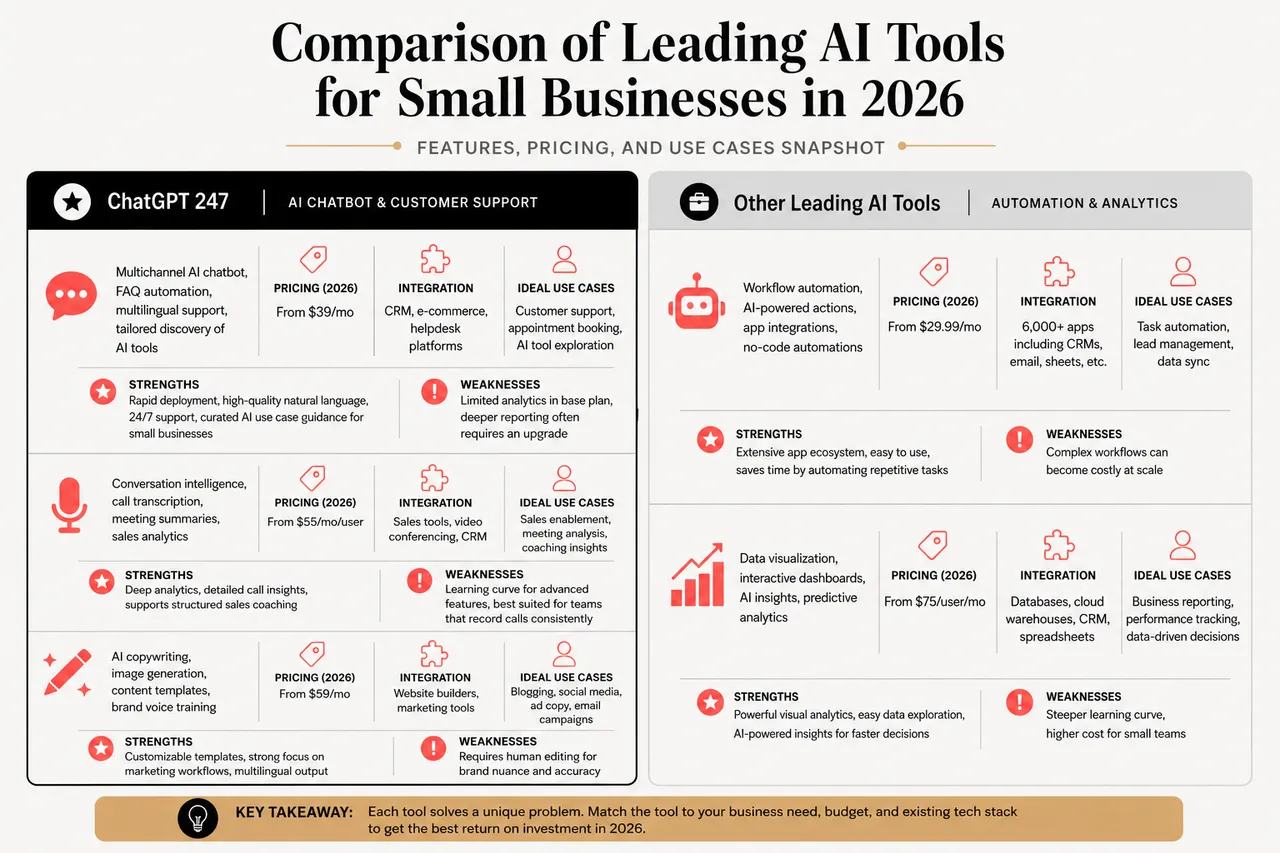
Comparison Table: Features, Pricing, and Use Cases
The AI space for small businesses has expanded rapidly, and in 2026, you have a wealth of options across content creation, customer support, automation, and analytics. The following snapshot compares five representative tools, including ChatGPT 247, that solve different problems and reflect what many small companies are adopting today.
| AI Tool | Key Features | Pricing (2026) | Integration | Ideal Use Cases | Strengths | Weaknesses |
|---|---|---|---|---|---|---|
| ChatGPT 247 | Multichannel AI chatbot, FAQ automation, multilingual support, tailored discovery of AI tools | From $39/mo | CRM, e-commerce, helpdesk platforms | Customer support, appointment booking, AI tool exploration | Rapid deployment, high-quality natural language, 24/7 support, curated AI use case guidance for small businesses | Limited analytics in base plan, deeper reporting often requires an upgrade |
| Avoma | Conversation intelligence, call transcription, meeting summaries, sales analytics | From $55/mo/user | Sales tools, video conferencing, CRM | Sales enablement, meeting analysis, coaching insights | Deep analytics, detailed call insights, supports structured sales coaching | Learning curve for advanced features, best suited for teams that record calls consistently |
| Jasper | AI copywriting, image generation, content templates, brand voice training | From $59/mo | Website builders, marketing tools | Blogging, social media, ad copy, email campaigns | Customizable templates, strong focus on marketing workflows, multilingual output | Requires human editing for brand voice consistency and compliance, can generate more content than a small team can realistically publish |
| Google Workspace with Gemini | AI-powered email, document intelligence, spreadsheet analysis, scheduling assistance | From $13/mo/user | Full Google ecosystem, third-party apps | Document management, internal collaboration, knowledge retrieval | Seamless integration with existing Google tools, familiar interface for most employees | Limited customization outside Google apps, heavy reliance on the Google ecosystem may be restrictive for some stacks |
| Rippling | HR automation, workflow orchestration, compliance management | From $8/mo/user | Payroll, HRIS, accounting platforms | HR, payroll, onboarding, access control | End-to-end workflow automation across HR and IT, built-in compliance tools | Most effective for organizations with 10+ employees, smaller teams may not use its full range of features |
| Key Metric | Typical Impact for Small Businesses | Relevant Tool Types |
|---|---|---|
| Time saved on repetitive tasks | Owners commonly report reclaiming multiple hours per week once email drafting, FAQs, and scheduling are automated, which compounds quickly over a year. | Chatbots like ChatGPT 247, office assistants such as Gemini, workflow tools, and content generators |
| Customer response speed | AI support can reduce response times from hours to minutes, which often correlates with higher satisfaction and repeat business. | Customer support bots, AI helpdesk integrations, website chat widgets |
| Content production capacity | Marketing teams routinely report producing several times more drafts and ideas by combining AI writing and image tools with human editing. | AI copywriting platforms, image generation tools, planning assistants |
Choosing by Category: Chatbots, Automation, Marketing, Analytics
Matching the right category of AI tool to your main challenge is where you’ll see the biggest impact. Rather than installing everything at once, pick a category that maps directly to your most pressing bottleneck, then expand gradually.
- AI chatbot integration for customer-facing work: If customer inquiries, bookings, or support requests dominate your inbox, an AI chatbot like the ones you can deploy through ChatGPT 247 is often the highest-impact starting point. These tools can answer routine questions instantly, guide visitors through ordering or booking processes, and hand off complex issues to humans when needed. Over time, they build a searchable record of common questions, which helps you refine website content and support policies.
- Image generation tools for visual branding: For small teams without dedicated designers, AI image tools provide fast, on-brand graphics for social posts, ads, and product pages. Used thoughtfully, they help you maintain a consistent visual presence across channels and run more experiments with creative variations. Because they can produce many options quickly, it is important to combine them with clear guidelines so your visuals stay aligned with your brand identity.
- Automated translation services for new markets: When you start attracting customers from different language backgrounds, translation tools allow you to localize key assets at scale. Product descriptions, support documentation, and marketing campaigns can be adapted for new regions far more quickly than through manual translation alone. As you evaluate tools, check that they support your target languages and let you review or customize terminology that matters in your niche.
- SEO optimization assistance for organic visibility: If your main challenge is getting discovered online, AI tools that help with keyword research, on-page optimization, and content structuring can be powerful. Combined with platforms that generate or repurpose content, they support a steady publishing cadence that drives search traffic over time. Many small businesses in 2026 treat AI as a co-writer and analyst for their blog and service pages, using the tools to identify opportunities and draft content while keeping strategy and oversight in-house.
- FAQ automation and knowledge bases for efficiency: Frequently asked questions consume a surprising amount of support time. AI tools that power dynamic FAQ pages or searchable knowledge bases help customers find answers faster and reduce ticket volume. Solutions that integrate with platforms like ChatGPT 247 can pull answers from your documentation, policy pages, and prior conversations, which keeps information consistent and up to date.
Common Misconception: Not all AI tools are plug-and-play. Implementation quality matters as much as the platform itself, so carefully review how each tool will fit into your systems, what data it will access, and what ongoing support is available to help you navigate inevitable questions and edge cases.
Real-World Examples and Case Studies
Case Study 1: Automating Customer Support with ChatGPT 247
Consider a small online retailer that used ChatGPT 247 to manage after-hours support. Before AI, customers waited hours for a response, especially on evenings and weekends. After launching the chatbot, replies came within minutes, regardless of the time of day, and the bot could answer most routine questions about order status, returns, and product details. Customer satisfaction jumped noticeably, and the support team had more time for proactive outreach, such as following up with high-value customers or refining help articles.
Case Study 2: Improving Sales with Avoma
A business consulting firm started using Avoma to record and analyze every sales call. Automated transcripts and keyword tagging helped managers spot patterns, such as which objections stalled deals and which questions led to faster closes. In just a few months, the sales team closed significantly more deals, and CRM notes became more accurate thanks to seamless integration, which made forecasting and pipeline reviews more reliable.
- Focusing on the biggest pain point first: Both businesses saw real improvements by picking AI tools that directly tackled their biggest headaches, whether that was customer support overload or missed sales opportunities. Rather than installing multiple tools at once, they focused on a single use case, measured the impact, and then used those results to guide further AI investments.
- Allowing time for setup and iteration: Initial configuration, training, and experimentation took some effort, including refining chatbot scripts and adjusting call tagging rules. However, once the workflows were stable, the measurable results made the upfront work worthwhile, and future adjustments became easier as teams grew more comfortable with the tools.
Common Misconception: AI isn’t just for big corporations with large IT budgets. Small businesses are seeing meaningful returns by solving everyday problems with smart tools, especially when they start with narrowly focused projects that prove value quickly.
Tips for First-Time Buyers and Common Pitfalls to Avoid
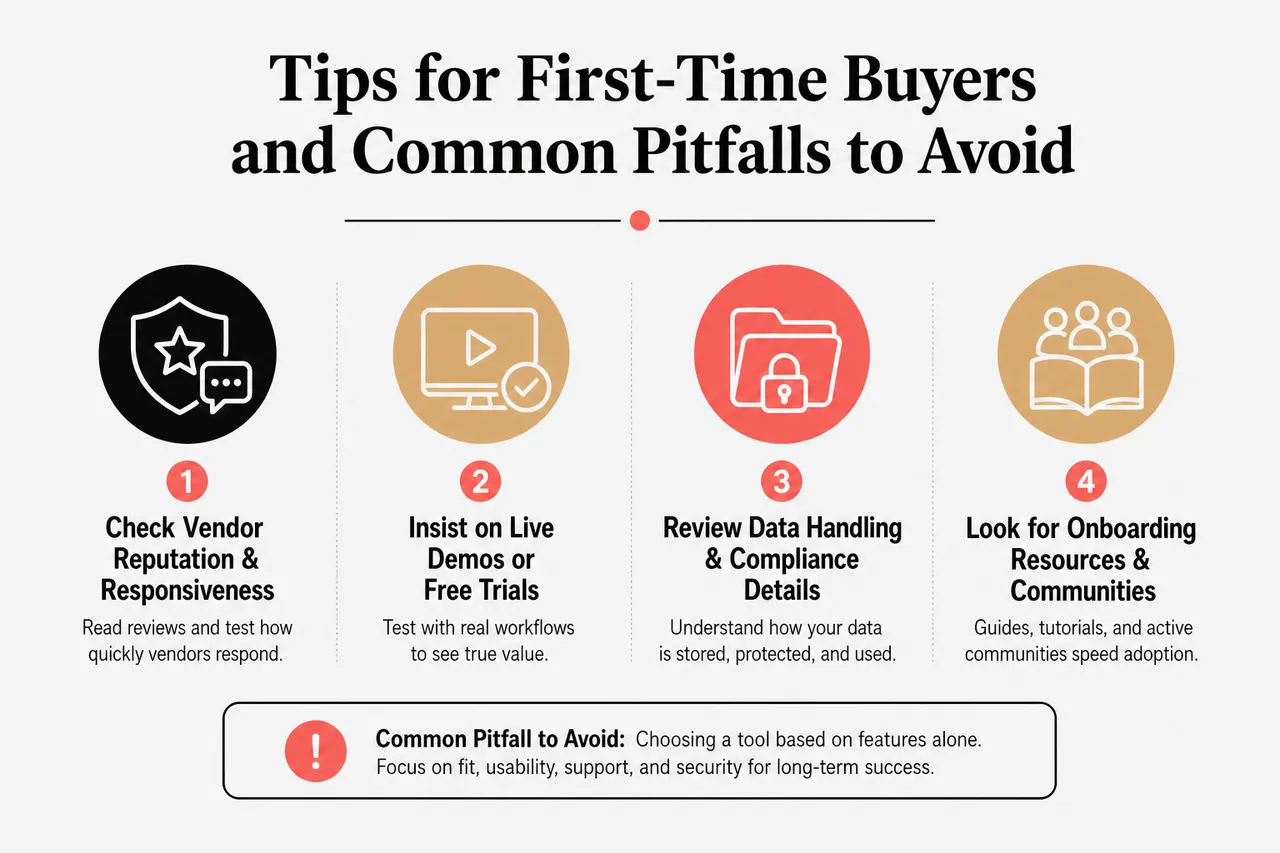
First-Time Buyer Checklist
- Check vendor reputation and responsiveness: Read reviews, ask peers, and test how quickly vendors respond to questions. A platform that offers strong functionality but slow support can become frustrating during implementation. Tools like ChatGPT 247 that actively guide users through discovery and setup often stand out because they reduce uncertainty and help non-technical teams move faster.
- Insist on live demos or free trials: Seeing the tool in action with your workflows is critical. Use a trial period to set up at least one real process, such as customer FAQ automation or meeting summaries, rather than just exploring the interface. The way a platform behaves under real data and tasks often reveals whether it truly fits your business.
- Review data handling and compliance details: Before committing, understand how the tool stores, processes, and protects your data. Ask whether you can restrict training on certain conversations or documents, how long logs are kept, and what options exist for data export. This is particularly important if you work in finance, healthcare, or other regulated sectors.
- Look for onboarding resources and communities: Comprehensive guides, tutorials, and user forums dramatically shorten the learning curve. Vendors that invest in education signal that they expect long-term relationships, not just one-time sales. Whether you are exploring ChatGPT 247 or a specialized marketing tool, chances are that active communities will share tips and best practices that apply directly to your use cases.
- Examine contracts, scaling costs, and exit options: Read the fine print on pricing tiers, user limits, and cancellation policies. Some tools are inexpensive at small scale but grow costly as usage increases, while others bundle advanced features that you may not need yet. Understanding how costs change as you add users or automate more workflows helps you avoid surprises and plan a sustainable roadmap.
Pitfalls to Avoid
- Buying more features than you can realistically use: It is easy to get excited about comprehensive platforms, but small teams often benefit most from focused tools that solve one or two core problems. Overbuying features can lead to underutilization and frustration, especially if the team does not have time to learn everything. Start with the simplest setup that addresses your top priority, and expand only when existing tools are clearly delivering value.
- Skipping team training and change management: Even intuitive tools require some orientation. If you introduce AI without training or explanation, adoption may stall and users may mistrust the results. Schedule short workshops, share guidelines for responsible use, and make space for questions so employees understand why the tools were chosen and how they should be used in their daily work.
- Ignoring integration and workflow design: Choosing a strong tool but failing to connect it properly to your systems can leave you with more manual work, not less. For example, if a chatbot doesn’t log conversations into your CRM or if an automation platform is not synced with your email and payment tools, you may still end up copying data by hand. Draw simple diagrams of your workflows before implementation and make sure the tool plugs into each key step.
- Overlooking security and governance: Failing to monitor permissions, data access, and sharing can put your business at risk. Establish rules for what information should and should not be fed into AI tools, and regularly review who has admin rights. As your usage grows, consider appointing someone to oversee AI governance, even part-time, so policies stay aligned with evolving regulations and vendor updates.
Common Misconception: The most expensive or complex platform is not automatically the right fit. Solutions that match your needs, integrate cleanly, respect your data, and come with strong support frequently deliver better outcomes than advanced tools that remain underused.
Making AI Work for Your Small Business in 2026
Next Steps and Resources
Success with AI is all about staying flexible and open to change. Implementation is not a single project but an ongoing practice of testing, measuring, and refining. Keep your checklists and comparison tables handy, because they will help you evaluate new solutions as your business grows or as new options hit the market. Platforms like ChatGPT 247 can play a continuing role here by helping you discover emerging tools, interpret industry trends, and design new use cases as your needs evolve.
- Apply consistent selection criteria to every new tool: Whether you are exploring a chatbot, a marketing assistant, or a workflow automation platform, judge each option against the same criteria for cost, integration, security, and support. Consistency prevents impulsive purchases based on hype and ensures your stack remains coherent as it expands.
- Encourage ongoing feedback from your team: Ask employees regularly how AI tools are affecting their work, both positively and negatively. Their insights can reveal hidden opportunities, such as automating new steps in a process, and highlight issues like confusing interfaces or gaps in training. Treat AI usage as an evolving collaboration between technology and people, not a one-time installation.
- Track concrete results tied to business metrics: Monitor changes in time saved, response times, sales conversion, content output, and error rates. Use simple dashboards or spreadsheets to compare these metrics before and after implementation. If tools like ChatGPT 247 or Avoma are delivering measurable gains, consider deepening your investment; if not, adjust workflows or explore alternatives.
| AI Adoption Area | Typical First Step | Recommended Tool Types |
|---|---|---|
| Customer service and support | Automate FAQs and after-hours inquiries to stabilize response times and relieve staff. | AI chatbots such as ChatGPT 247 deployments, website chat integrations, helpdesk assistants |
| Marketing and content | Create a content calendar and test AI for drafting blog posts, emails, and social updates. | Copywriting tools, image generators, SEO assistants |
| Internal productivity | Use AI Basically documents, structure meeting notes, and automate routine reporting. | Office assistants embedded in email and documents, note-taking AI, project management intelligence |
| Operations and HR | Digitize onboarding steps and standard workflows before layering AI on top. | Workflow automation platforms, HR automation tools, integrated compliance assistants |
With the right approach, AI can transform the way your small business operates, helping you save time, delight customers, and unlock new growth. Start by focusing on real problems, use structured checklists to guide your choices, and experiment with pilots before rolling out bigger changes. By staying curious, listening to your team, and using discovery platforms like ChatGPT 247 to keep an eye on new solutions, you will keep your business ahead of the curve and ready for whatever comes next.
Strategic Angles Many Small Businesses Overlook When Choosing AI
Aligning AI Choices With Long-Term Strategy, Not Just Quick Wins
Many owners start with tools that promise immediate time savings, but long-term success comes from aligning AI investments with broader strategic goals such as market expansion, brand differentiation, or recurring revenue growth. When evaluating platforms, ask how each tool will still be useful in two or three years as your offerings and customer base evolve, and use resources like ChatGPT 247 to explore scenarios and stress-test your assumptions.
Designing Human-in-the-Loop Workflows Rather Than Full Automation
Pure automation is rarely the right answer for small businesses that rely heavily on relationships and nuanced judgment. Instead, design workflows where AI drafts, summarizes, or routes information, and humans make final decisions. This human-in-the-loop approach preserves quality and trust while still capturing the majority of time savings that AI tools can deliver.
Building AI Literacy Across the Team, Not Just at the Top
AI tools are most powerful when everyone understands their capabilities and limits. Invest a bit of time in teaching employees how to formulate good prompts, interpret AI outputs critically, and escalate issues when something seems off. As AI literacy grows, staff will naturally identify new use cases and help you avoid missteps, turning your team into an active partner in your AI strategy rather than passive users of new software.
Related posts:
 AI Language Models Explained (and How to Choose the Right One for Your Use Case)
 Key Artificial Intelligence Technologies Powering Modern Business in 2026
 AI Technology Trends in 2026 That Business Leaders Can’t Ignore
 Revolutionary code generation tools: GPT and artificial intelligence
 How OpenAI’s AI Tools Are Changing Content, Code, and Customer Experience?
 OpenAI for Non‑Developers: How to Start Using AI Tools in Your Workflow